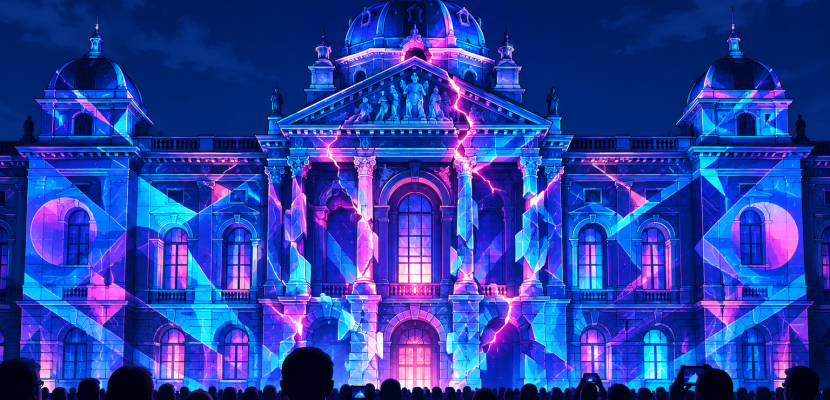
Projection mapping is the technique of aiming a projector at a surface that isn’t a flat screen, such as a building, a sculpture, a stage set or a face, and warping the video so it fits that surface exactly. The light lines up with the edges, windows and folds of the object, so the object itself appears to move, crack, glow or transform. This guide explains how it works, what you need, and why so many artists have made it central to their practice.
What projection mapping actually means
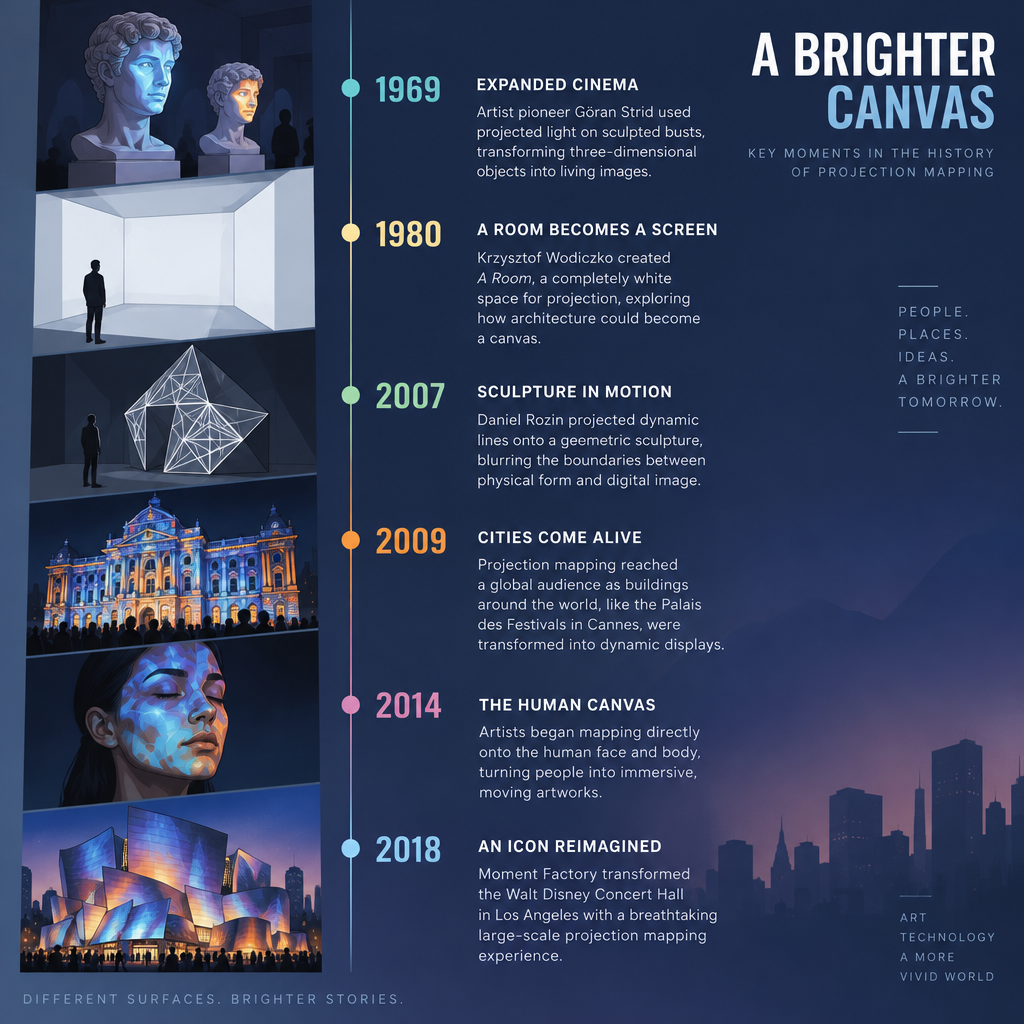
Strip away the spectacle and projection mapping is a geometry problem. A projector throws a rectangle of light. Your surface is almost never a rectangle facing the lens squarely. Mapping is the work of reshaping the image so every pixel lands where you want it on the real object.
You’ll hear the same idea under several names. Video mapping and mapping video projection are common in Europe and in VJ culture. Digital projection mapping and digital mapping projection show up in event and AV industry copy. Researchers call it spatial augmented reality, a term popularised by Oliver Bimber and Ramesh Raskar’s 2005 book Spatial Augmented Reality: Merging Real and Virtual Worlds. People also search for “project mapping” and “project projections”, which are just slips for the same thing.
The practical difference from a normal screening is simple. On a screen, the surface is neutral and the picture is the point. In a mapped piece, the surface is half the artwork. A Gothic facade, a crumpled paper sculpture or a car body carries its own shape, texture and meaning, and the projected media is designed around it.
A short history in landmark works
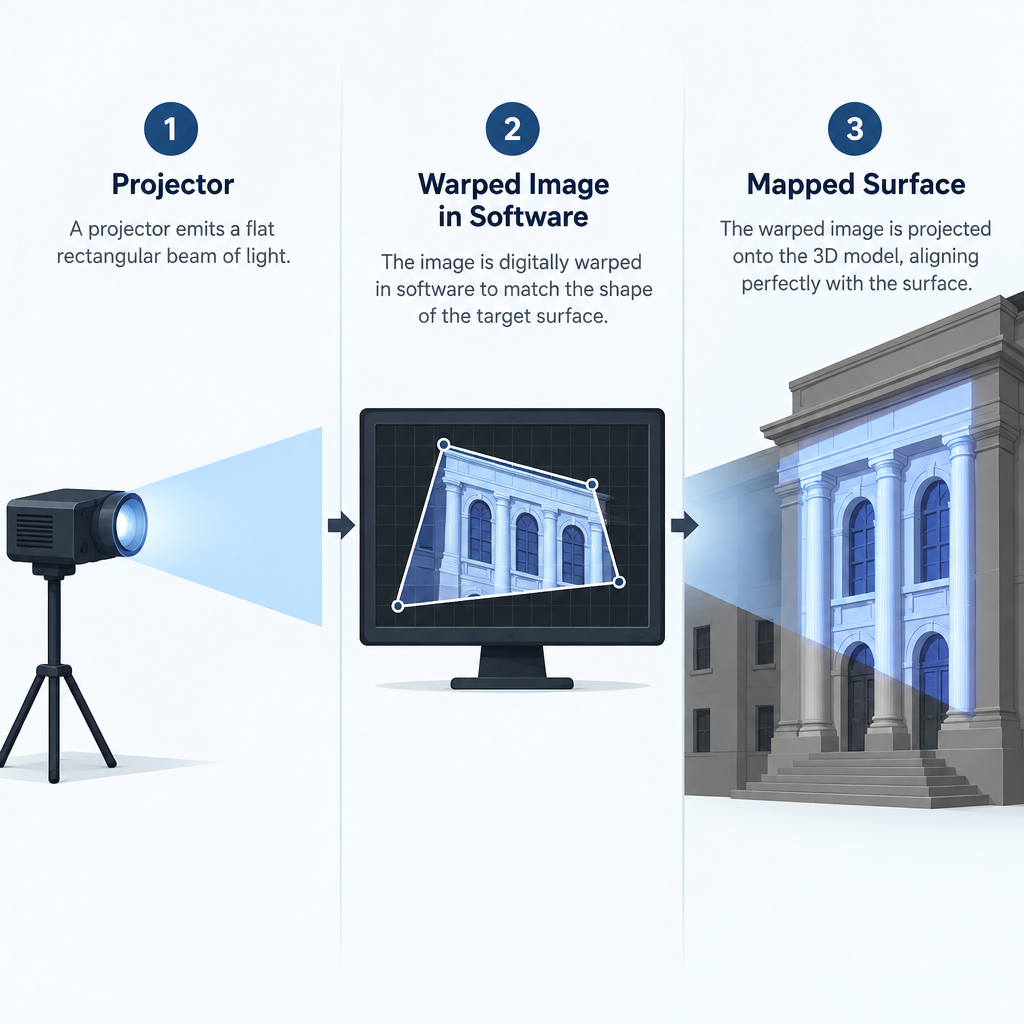
Projection mapping feels like a 2010s trend, but its roots go back more than fifty years. The table below lists works that are widely cited as milestones, with dates taken from published sources.
| Year | Work | Creator | What it showed |
|---|---|---|---|
| 1969 | Haunted Mansion “Grim Grinning Ghosts” busts | Disneyland Imagineers | Filmed singing faces projected onto blank sculpted busts |
| 1980 | Displacements | Michael Naimark | A furnished room filmed, painted white, then re-projected onto itself |
| 1998 | “The Office of the Future” | Raskar and colleagues, UNC Chapel Hill | Research into projecting onto everyday room surfaces |
| 2001 | “Shader Lamps” | Raskar, Welch, Low, Bandyopadhyay | Animating real objects with image-based illumination |
| 2007 | Augmented Sculpture | Pablo Valbuena | Projection that reads and redraws a geometric sculpture’s edges |
| 2009 | How It Would Be, If a House Was Dreaming | 555 KUBIK | Facade piece on the Hamburg Kunsthalle |
| 2013 | Box | Bot & Dolly | Mapping onto panels moved by industrial robot arms |
| 2014 | OMOTE | Nobumichi Asai | Real-time tracked projection onto a moving human face |
| 2018 | WDCH Dreams | Refik Anadol | Machine-learning visuals projected onto the Walt Disney Concert Hall |
Two threads run through that list. One is entertainment and theme parks, where projected faces on busts proved decades ago that light could give objects life. The other is research and fine art, where people asked what happens when the room, the sculpture or the body becomes the display.
The 2009 facade works were a turning point for public audiences. Video of building projections spread quickly online, festival programmers took notice, and AV shows on monuments became a fixture of city events.
Why artists use projection mapping
It turns any space into a canvas
You don’t need a gallery with white walls. A disused factory, a church ceiling, a staircase or a tree can carry a projected work. That freedom matters to artists working outside institutions, and it matters to festivals that want to activate a whole city centre for a few nights.
The surface becomes a collaborator
A good mapped piece works with the architecture instead of covering it. Columns become piano keys, windows light up one by one, a cornice appears to drip. Valbuena’s Augmented Sculpture is a clear example: the projected lines only make sense because they trace a real physical form. Light alone would be meaningless, and the bare sculpture would be static.
Scale with almost no permanent footprint
Projection lets you work at the size of a building without touching it. When the projectors switch off, the facade is unchanged. Heritage sites can host contemporary work, and cities can stage temporary events without permanent construction. Compare that with an LED wall, which is a structure you have to build, power and remove.
It reaches a huge, free audience
Facade projections are public by nature. People walk past, stop and watch. Long-running festivals show how powerful that is:
- Fête des Lumières, Lyon. The festival grew from a tradition that began on 8 December 1852, when residents lit candles in their windows. Today it is a multi-day light festival around that date, with mapped projections across the city.
- Vivid Sydney. Running since 2009, it is known for lighting the Sydney Opera House sails, alongside projections across the harbour.
- Schlosslichtspiele, Karlsruhe. Launched in 2015 for the city’s 300th anniversary, it projects work by invited artists onto the facade of Karlsruhe Palace each summer, with the ZKM Center for Art and Media involved in the programme.
It can be live and dynamic
Mapped content doesn’t have to be a pre-rendered video. Many artists drive it from real-time software, reacting to sound, sensors, cameras or performers. OMOTE tracked a moving face and re-mapped the projection live, which is a very different technical challenge from a fixed wall.
How projection mapping works
Every mapped piece, from a shoebox model to a cathedral, comes down to three layers: geometry, content and playback.
Layer 1: geometry and warping
The projector’s image starts as a flat rectangle. You reshape it in software until it matches the surface. There are three main ways to do that.
Corner pin (four-point warp). You drag the four corners of the image onto four points on the surface. Mathematically this is a perspective transform, often called a homography, and four point pairs are enough to define it. It works well for flat faces seen at an angle, like a wall or a box side.
Mesh or Bezier warp. The image is divided into a grid of control points. You can bend the grid to fit curved or uneven surfaces, such as a column, a dome or a sagging fabric screen. More points give finer control and more work.
3D model mapping. You build or scan a 3D model of the object, place a virtual camera where the real projector sits, and match the virtual lens to the real one. The software then renders the model from the projector’s viewpoint. This is how large building shows are typically done, because it lets you design content in 3D and have it land correctly. Pro media servers add camera-based calibration, such as disguise’s OmniCal, to automate the matching.
Most projects also use masks. A mask blacks out any light that would spill past the surface, onto the sky, the pavement or the audience. Clean masks are a big part of what makes mapping look intentional.
Warping and blending across several projectors
One projector is rarely enough for a big surface. Multiple projectors bring more pixels and more brightness, but their images have to join without a visible seam. That’s edge blending.
You overlap neighbouring images and fade each one out across the overlap so the combined brightness stays even. The fade isn’t a straight line. Projectors don’t respond linearly to signal level, so blend curves are gamma-corrected, and most software lets you tune the curve by eye.
The hard part is black. A projector can’t output true black; a “black” pixel still emits some light. In the overlap two projectors stack that faint glow, so dark scenes reveal a brighter band. Pro tools include black-level compensation for this, and content designers often avoid long, pure-black passages on blended rigs.
Studio tip
When blending, test with a mid-grey frame and a dark grey frame, not a bright image. Seams that vanish on white jump out on grey, and that’s what your audience will see during quiet moments.
Layer 2: content designed for the surface
You can’t drop a random video onto a facade and call it mapping. The content has to be made from a template of the surface: a photo taken from the projector’s position, a line drawing, or the 3D model.
Artists then animate with the architecture. Common moves include:
- tracing edges with lines of light, so the structure seems to draw itself
- painting fake shadows that suggest the wall is rotating, cracking or bulging
- “removing” bricks or windows with animated black holes that read as depth
- revealing a different material, such as water, stone or fire, across real geometry
The illusion of depth relies on the viewer standing roughly where you expect. A fake shadow only looks right from a limited range of positions. Festival works are usually designed for the main viewing area, and the effect weakens off to the sides.
Layer 3: playback
Finally, something has to play the content in sync, through the warp, out to each projector. For a small piece that’s a laptop running mapping software. For a large show it’s a dedicated media server that can handle many outputs, timecode and live control.
Projectors: brightness, throw and resolution
Choosing the right projector shapes everything else about a project. Three numbers matter most.
Brightness. Measured in ANSI lumens, a standard method that averages readings across the image. Brightness spreads over area, so the bigger the projected image, the dimmer each square metre. Ambient light is the enemy: street lights, a sunset or a lit room can wash out a projection completely. Flagship laser projectors from makers such as Christie and Panasonic reach into the tens of thousands of lumens, and building shows often stack several units on the same area. We won’t put a lumen number on “enough” for your project, because it depends on surface size, surface colour, ambient light and the content itself. Testing on site beats any formula.
Throw ratio. This tells you how far the projector must be from the surface to fill a given width. Throw distance equals throw ratio times image width. Zoom lenses give a range of ratios, which buys you flexibility in positioning.
| Throw ratio | Image width 2 m | Image width 5 m | Image width 10 m |
|---|---|---|---|
| 0.5 (short throw) | 1.0 m away | 2.5 m away | 5.0 m away |
| 1.0 | 2.0 m away | 5.0 m away | 10.0 m away |
| 1.5 | 3.0 m away | 7.5 m away | 15.0 m away |
| 2.0 | 4.0 m away | 10.0 m away | 20.0 m away |
| 4.0 (long throw) | 8.0 m away | 20.0 m away | 40.0 m away |
The numbers in this table follow directly from the formula. Short-throw lenses help in tight indoor spaces; long-throw lenses let you sit far back from a facade, behind the audience.
Resolution and lens shift. Common native resolutions are 1920 × 1080, 1920 × 1200 (WUXGA) and 3840 × 2160 (4K UHD). Every pixel you spend on warping or masking is a pixel lost to the final image, so position the projector to fill the surface as tightly as you can. Use optical lens shift to move the image instead of the projector’s built-in digital keystone. Lens shift moves the image with glass and keeps every pixel; digital keystone resamples the picture inside the projector before your mapping software even touches it.
Heads up
Projectors get hot and need airflow. Never box one in for an outdoor or long-running install without proper ventilation and weather housing, and check the manufacturer’s rated orientation before mounting it at a steep angle.
Software for projection mapping
You have far more choice than you did a decade ago, including several free options. The table lists established tools and what we can confirm about them. Prices change often, so we haven’t listed them; check each vendor before you buy.
| Software | Made by | Cost model | Platforms | Best for |
|---|---|---|---|---|
| MadMapper | GarageCUBE | Paid, demo available | macOS, Windows | Fast, artist-friendly mapping and LED control |
| Resolume Arena | Resolume | Paid, demo available | macOS, Windows | VJs; Arena adds warping and edge blending |
| HeavyM | Digital Essence | Paid tiers, free trial | macOS, Windows | Beginners who want built-in effects |
| Millumin | Anomes | Paid, demo available | macOS only | Theatre and dance with timeline cues |
| TouchDesigner | Derivative | Free Non-Commercial, paid licences | macOS, Windows | Generative, interactive and live mapping |
| MapMap | Open-source project | Free, open source | macOS, Windows, Linux | Learning the basics at no cost |
| Keystone library | David Bouchard | Free | Processing | Corner-pinning your own sketches |
| ofxPiMapper | Krisjanis Rijnieks | Free, open source | openFrameworks, Raspberry Pi | Cheap, standalone gallery installs |
| disguise | disguise | Hardware and software systems | Proprietary servers | Large touring shows and broadcast |
| Pandoras Box | Christie | Paid, pro systems | Windows-based servers | Large multi-projector events |
| WATCHOUT | Dataton | Paid, pro systems | Windows | Multi-display shows and exhibitions |
A few notes from working with these:
- TouchDesigner’s Non-Commercial licence is free but caps output at 1280 × 1280 pixels. That’s plenty for learning and small pieces, and you’ll hit the limit on multi-projector work. Its Palette includes the kantanMapper component for quick quad and shape mapping and the stoner component for grid-based warping, plus camSchnappr for matching a virtual camera to a real projector using a 3D model.
- Resolume Avenue and Arena share an interface, but warping and edge blending sit in Arena.
- Code-based routes are real options. The Processing Keystone library gives you draggable corner-pin surfaces in a few lines. You can also prototype mapped content in a browser with p5 js, then send it full screen to a projector. That’s how the live sketch at the end of this article works.
The pro end of the market, the systems from disguise, Christie and Dataton, is built for large shows where hundreds of thousands of people are watching. They add timecode sync, redundancy and automated calibration. You don’t need any of that for your first piece.
Where projection mapping shows up
Festivals and public art
Light festivals are the most visible home for mapped work. Lyon, Sydney and Karlsruhe are three of many, and the format is the same everywhere: a landmark, a curated set of artists, free entry, crowds in the street. Christie and other AV brands publish case studies of building, cathedral and temple projections worldwide, which are a good way to see how professionals approach rigging and scale.
Immersive rooms and museums
Projection on every wall and floor of a room has become its own genre. teamLab Borderless, which opened in Tokyo in 2018, made the format famous with flowing digital artworks that move between rooms. Many touring “immersive” exhibitions use the same principle: multiple blended projectors covering a large space.
Theatre, dance and live performance
Stage designers map scenery, floors and costumes. Because performers move, timing and cueing matter more than in a static piece, which is why tools like Millumin focus on timelines and cues.
Product launches and brand events
Cars, shoes and architectural models are regular mapping targets at launches. The object is real and the projection gives it a temporary skin. Bot & Dolly’s Box showed how far this can go when the surfaces themselves move on robots, with the projection tracked to their motion.
Small-scale art
Plenty of strong mapped work fits on a desk: paper sculptures, stacks of white boxes, a plaster bust. This is the best place to learn, because you can iterate in minutes instead of waiting for a dark night outdoors.
When projection is the wrong tool
Projection mapping is powerful, but it isn’t always the right choice, and saying so saves you money and frustration.
- Daylight and bright rooms. Projection competes with ambient light and usually loses. For daytime outdoor displays, emissive LED is the practical option.
- Dark or busy surfaces. Projected light reflects best off pale, matte surfaces. A black, glossy or patterned surface swallows or scatters the image.
- Audiences that walk through the beam. Front projection casts shadows of anyone between the lens and the surface. Place projectors high, or design the shadows into the piece.
- Permanent, unattended installs. Projectors need maintenance and eventually replacement. Laser light sources last much longer than old lamp-based units, but a permanent piece still needs a care plan.
The upside of projection is that the surface stays real. LED replaces the surface; projection reveals and transforms it. If the architecture or object is the point, projection wins.
Starting your first projection mapping project
You don’t need a building or a big budget. A borrowed projector and a few white boxes teach you most of what matters.
Quick steps: your first mapped piece
- Stack three or four white cardboard boxes at different angles.
- Place the projector so its image covers the whole stack.
- Fix the projector in place; moving it later breaks the mapping.
- In your software, create one quad surface per visible box face.
- Drag each quad’s corners onto that face’s corners.
- Assign a different colour to each face to check alignment.
- Replace colours with animated content and add masks.
- Darken the room and watch from the audience’s position.
Some habits make a big difference:
- Lock everything down. A bumped projector or a box that shifts a few millimetres throws off the whole map. Tape the projector’s footprint and the object’s position.
- Map from the projector’s view. Photograph the surface from right beside the lens. That photo is your template for designing content.
- Design with the edges. Your first piece will look better if you highlight the object’s structure rather than playing a movie across it.
- Warm up the projector. Brightness and colour can shift as a projector heats up, so let it run before you do any final colour matching.
Generative content is a natural fit for mapped surfaces. Smooth, organic motion from noise functions looks good on almost any shape and never repeats in a way the audience can spot. Our “perlin noise tutorial” covers the noise() function that drives the live example below.
Studio tip
Draw a thin bright outline around each mapped face, then animate its thickness. It’s the quickest way to prove your alignment is accurate, and it reads as a deliberate design element.
FAQ
What is projection mapping in simple terms?
It’s projecting video onto a real object or building and shaping the image so it fits the object’s form. The projected light follows the object’s edges, so the object itself appears to change.
Is projection mapping the same as video mapping?
Yes. Video mapping, mapping video projection, digital projection mapping and spatial augmented reality all describe the same technique. The name changes with the industry and region.
Can you do projection mapping for free?
You can. TouchDesigner’s Non-Commercial licence is free with a 1280 × 1280 output cap. MapMap is free and open source. Processing with the Keystone library and openFrameworks with ofxPiMapper are free code-based options. You still need a projector, which you can often borrow or rent.
How bright does a projector need to be?
It depends on the size of the image, the surface colour and how much ambient light there is. Indoors on a small pale object, a modest home or office projector can work. Building facades need far more brightness, usually from several high-output projectors stacked together. Always test on site.
Does projection mapping damage buildings?
Projected light leaves no physical mark, which is one reason heritage sites agree to host it. The practical risks are the rigging and equipment around the site, and you’ll typically need permission from the building owner and the local authority for public work.
Do I need 3D software to get started?
No. Corner-pin and mesh warping handle most first projects. 3D model mapping becomes useful when you work on complex architecture or want content that wraps convincingly around depth.
Try it live
This sketch simulates the core move of projection mapping. The grey shape is a “wall” seen at an angle. Drag the four orange handles until the animated content fits it, the same way you’d corner-pin a surface in mapping software. Press G to toggle the grid and R to reset. The warp here is a bilinear mesh, the same idea behind grid warping tools, and the colours come from p5’s noise() function.
// Projection mapping simulator: drag the orange corners onto the grey wall.
// Press G to toggle the warp grid, R to reset the corners.

let corners = [];
let dragging = -1;
let showGrid = true;
const N = 16; // how many grid cells across and down

// The "real" surface, like a wall seen at an angle from the projector
const wall = [[230, 130], [610, 90], [650, 500], [190, 450]];

function setup() {
  createCanvas(800, 600);
  resetCorners();
}

function resetCorners() {
  // Start as a flat rectangle, the way the projector's raw image looks
  corners = [
    createVector(150, 100),
    createVector(650, 100),
    createVector(650, 480),
    createVector(150, 480)
  ];
}

function draw() {
  background(15);

  // Draw the physical surface in dim grey
  noStroke();
  fill(55);
  beginShape();
  for (const p of wall) vertex(p[0], p[1]);
  endShape(CLOSE);

  // Draw the content as a grid of small quads warped between the corners
  const t = frameCount * 0.01;
  strokeWeight(1);
  for (let i = 0; i < N; i++) {
    for (let j = 0; j < N; j++) {
      const a = warp(i / N, j / N);
      const b = warp((i + 1) / N, j / N);
      const c = warp((i + 1) / N, (j + 1) / N);
      const d = warp(i / N, (j + 1) / N);

      // Smooth noise for colour, plus a band of light sweeping down
      const n = noise(i * 0.12, j * 0.12, t);
      const band = sin(j * 0.4 - frameCount * 0.05) * 0.5 + 0.5;
      const col = color(255 * n, 90 + 140 * band, 255 * (1 - n), 225);

      fill(col);
      // Matching stroke hides hairline gaps when the grid is off
      if (showGrid) stroke(0, 110);
      else stroke(col);
      quad(a.x, a.y, b.x, b.y, c.x, c.y, d.x, d.y);
    }
  }

  // Draw the four draggable corner handles
  for (let k = 0; k < 4; k++) {
    const p = corners[k];
    stroke(255);
    strokeWeight(2);
    fill(dragging === k ? color(255, 210, 0) : color(255, 120, 0));
    circle(p.x, p.y, 18);
  }

  // Instructions
  noStroke();
  fill(210);
  textSize(14);
  text('Drag the orange corners onto the grey wall. G: grid on/off   R: reset', 20, 580);
}

// Find a point inside the warped shape.
// u runs left to right, v runs top to bottom, both from 0 to 1.
function warp(u, v) {
  const top = p5.Vector.lerp(corners[0], corners[1], u);
  const bottom = p5.Vector.lerp(corners[3], corners[2], u);
  return p5.Vector.lerp(top, bottom, v);
}

function mousePressed() {
  for (let k = 0; k < 4; k++) {
    if (dist(mouseX, mouseY, corners[k].x, corners[k].y) < 14) {
      dragging = k;
      return;
    }
  }
}

function mouseDragged() {
  if (dragging >= 0) {
    corners[dragging].set(constrain(mouseX, 0, width), constrain(mouseY, 0, height));
  }
}

function mouseReleased() {
  dragging = -1;
}

function keyPressed() {
  if (key === 'g' || key === 'G') showGrid = !showGrid;
  if (key === 'r' || key === 'R') resetCorners();
}
Once you’ve lined it up, try a few variations. Raise N to 32 for a smoother warp, change the noise scale from 0.12 to 0.04 for broader shapes, or add a second set of corners to map a second “wall”. Send the sketch full screen to a real projector and you can map a cardboard box tonight.