What p5.js actually is p5.js is a set of JavaScript functions that handle the boring parts of graphics programming for you. You don’t write canvas boilerplate. Instead you call createCanvas(), circle(), fill() and background(), and p5.js draws to an HTML5 canvas behind the scenes.
Searches for “p5 javascript” and “p5js” lead to the same thing. The official name is written p5.js, with the dot.
The project sits under the Processing Foundation, the nonprofit behind Processing. Lauren Lee McCarthy started p5.js in 2013. Her goal was to bring Processing’s approach of sketching with code, built for artists, designers and beginners, to the web.
Where it came from
| Year | Milestone |
|---|---|
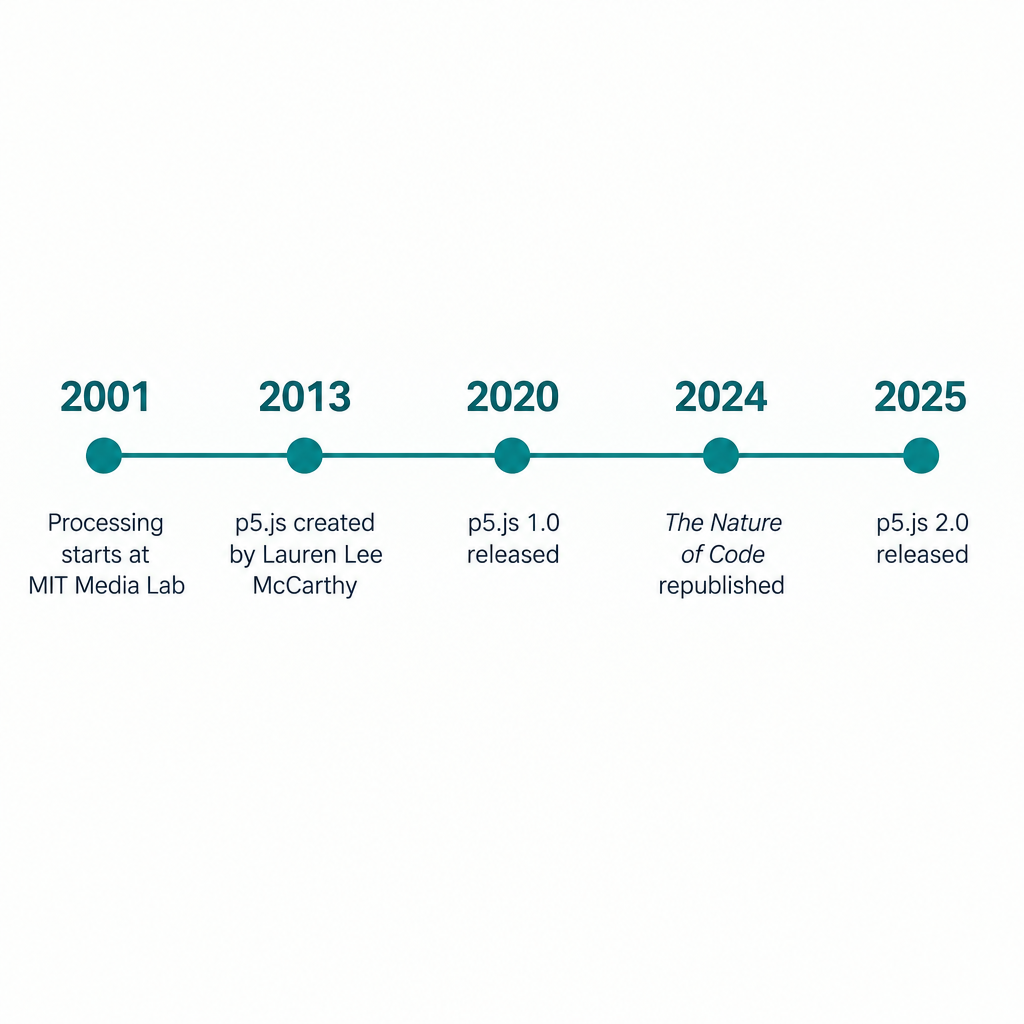
| 2001 | Casey Reas and Ben Fry start Processing at the MIT Media Lab |
| 2013 | Lauren Lee McCarthy begins p5.js |
| 2020 | p5.js 1.0 is released (February) |
| 2024 | Daniel Shiffman’s The Nature of Code is republished with p5.js examples (No Starch Press) |
| 2025 | p5.js 2.0 is released |
Why artists love it
The appeal is speed from idea to image. A p5.js program is called a sketch, and that word fits. You make quick, disposable experiments the way you would in a paper sketchbook.
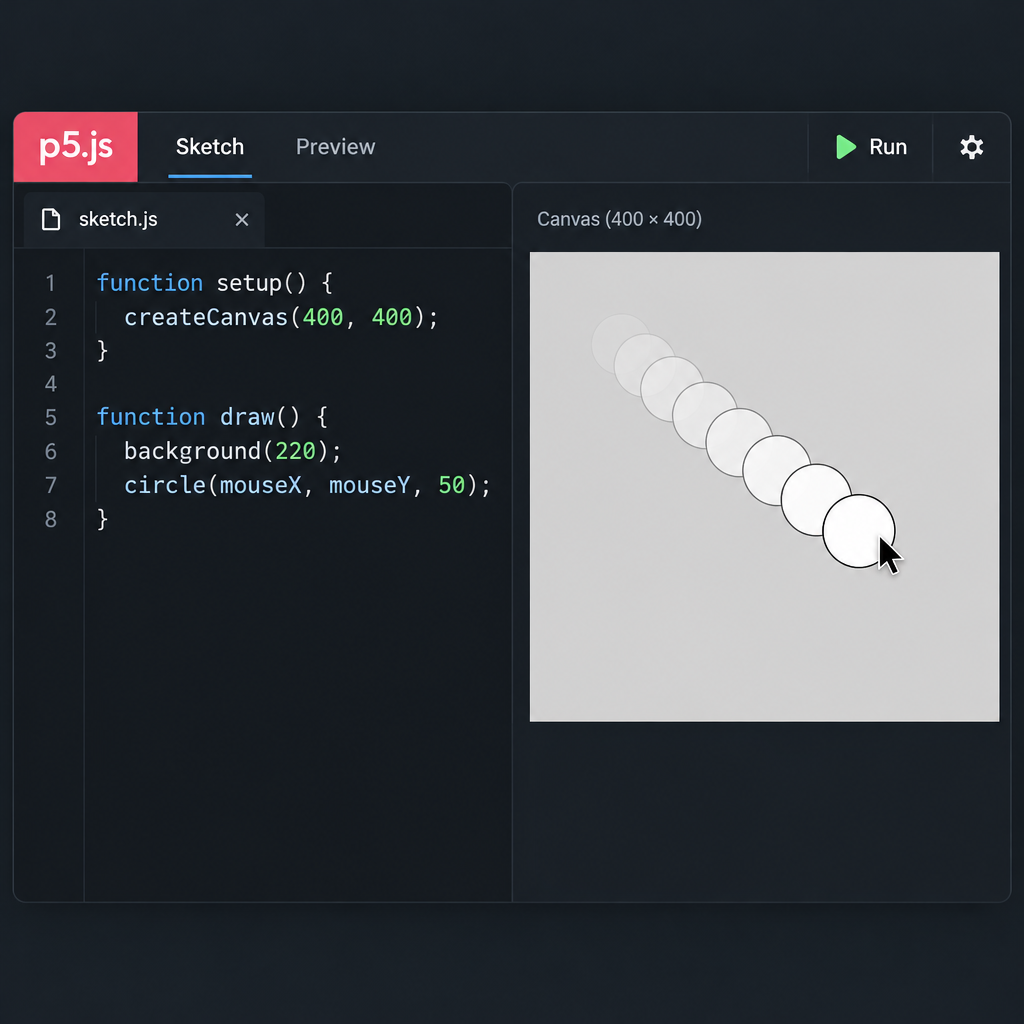
Here is the whole structure of a working sketch:
function setup() {
  // runs once at the start
  createCanvas(400, 400);
}

function draw() {
  // runs over and over, about 60 times a second
  background(220);
  circle(mouseX, mouseY, 50);
}
setup() runs once. draw() loops forever. mouseX and mouseY always hold the pointer position. That is enough to build interactive work, and most people get it on the first read.
A few more reasons artists stick with it:
- Sharing is a link. Your work runs in the browser, so anyone can see it without installing anything.
- Generative tools are built in.
random(),noise()(Perlin noise),map()andlerpColor()cover most of what generative art needs. - It grows with you. The same library handles 2D drawing, images, pixels, typography, and 3D through
createCanvas(w, h, WEBGL), including custom GLSL shaders withcreateShader(). - The teaching material is huge. Daniel Shiffman’s Coding Train videos and The Nature of Code use p5.js. That puts years of free tutorials one search away.
- Generative art platforms support it. Art Blocks, for example, lists p5.js among the libraries artists can build on.
How to start: download options and the Web Editor
You have several ways in. All of them are free.
| Option | Best for | What you need |
|---|---|---|
| p5.js Web Editor | Beginners, quick experiments, teaching | A browser; a free account to save sketches |
| Download page on p5js.org | Working offline in your own code editor | The p5.js or p5.min.js file plus an HTML page |
| CDN script tag | Adding p5.js to an existing website | One <script> tag pointing to a CDN such as jsDelivr |
npm package p5 |
Bundled JavaScript projects | Node.js and a build tool |
| OpenProcessing | Posting to a community gallery | A browser and an account |
Start in the Web Editor. It opens with a working setup() and draw() template, so you can press play right away and skip all setup.
Quick steps: your first p5.js sketch
- Open the p5.js Web Editor.
- Press play to run the default sketch.
- Add a circle that follows the mouse.
- Sign up free to save your work.
- Share the sketch link.
Key features worth knowing
| Area | Core functions | What you can make |
|---|---|---|
| Shapes and color | circle(), rect(), fill(), stroke(), colorMode() |
Drawings, patterns, posters |
| Motion | draw(), frameCount, millis() |
Animation and loops |
| Input | mouseX, mousePressed(), keyPressed() |
Interactive toys and instruments |
| Randomness | random(), noise(), randomSeed() |
Generative art, flow fields |
| Images and pixels | loadImage(), loadPixels(), get() |
Filters, glitch work, collage |
| 3D | WEBGL mode, box(), orbitControl(), createShader() |
3D scenes and shader art |
| Offscreen layers | createGraphics() |
Layered compositions, trails |
| Accessibility | describe(), textOutput(), gridOutput() |
Canvas descriptions for screen readers |
The accessibility functions are worth calling out because few graphics libraries offer anything similar. describe() adds a plain-language description of your canvas that screen readers can announce. It takes one line, and every sketch you publish should use it.
Studio tip
On high-density screens p5.js renders at extra resolution by default. If a busy sketch stutters, set pixel density to 1 in setup and it often runs noticeably faster.
p5.js 1.x or 2.0?
This matters for beginners. p5.js 2.0 arrived in 2025 and changed some fundamentals. The biggest change is file loading. In 1.x you load images and fonts inside preload(). In 2.0 you use async and await in setup(), and preload() is no longer part of the default API.
Most existing tutorials, books and videos were written for 1.x. If you are following older material, stay on 1.x until you are comfortable. The Processing Foundation kept 1.x as the Web Editor default during the transition, and you can switch versions in the editor’s settings.
Heads up
Code copied from a 1.x tutorial can fail silently in 2.0, especially anything using preload. Check which version your sketch is running before you debug.
p5.js compared with its neighbours
| Tool | Language | Runs where | Free | Pick it when |
|---|---|---|---|---|
| p5.js | JavaScript | Browser | Yes | You want fast, shareable 2D or light 3D sketches |
| Processing | Java (core mode) | Desktop app | Yes | You want desktop performance, or the original book examples |
| three.js | JavaScript | Browser | Yes | You need serious 3D scenes, models and lighting |
| TouchDesigner | Node-based, plus Python | Desktop | Free non-commercial tier | You build live visuals or installations |
The reference, examples and community
Three parts of the p5.js website do most of the teaching:
- Reference. Every function has its own page with a live example. When you wonder what
lerpColor()does, look here first. - Examples. Short, focused sketches sorted by topic, from shapes to shaders.
- Tutorials. Longer guides, including getting started, accessibility and WebGL.
The community is a big part of why p5.js feels welcoming. The project has a published community statement and runs events such as Processing Community Day. You’ll find people sharing work on r/p5js and OpenProcessing, and the project posts as @p5xjs.
Contributing and donating
The source code lives on GitHub in the processing/p5.js repository under the LGPL 2.1 licence. The contributor docs explain how to start, and issues marked “good first issue” are a gentle entry point. Writing documentation and translations counts as contributing too.
p5.js stays free because the Processing Foundation funds it, partly through donations. If the library earns you a living, chipping in keeps it maintained.
About the p5.js logo
The p5.js logo is the “p5*” wordmark set in the project’s signature hot pink. The asterisk is the recognisable part. The site’s older style sheets used #ED225D for that pink, but the current site design may differ, so don’t treat that value as an official brand spec.
The LGPL licence covers the code. It does not automatically grant rights to the logo. Check the Processing Foundation’s own guidance before you put it on merch or a product.
FAQ
Is p5.js free?
Yes. The library, the Web Editor and the documentation are all free. The code is open source under LGPL 2.1.
Is p5.js good for complete beginners?
Yes. It was designed for people with no programming background. The setup() and draw() structure and the live reference examples make the first hour unusually smooth.
What is the difference between p5.js and Processing?
Processing is a Java-based desktop environment. p5.js is a JavaScript library that runs in the browser. It is a reimagining of Processing for the web rather than a direct port, so syntax and function names differ in notable ways. For example, p5.js uses createCanvas() instead of size(), and push() and pop() replace pushMatrix()/popMatrix() and pushStyle()/popStyle().
Can p5.js do 3D?
Yes. WEBGL mode gives you 3D shapes, cameras, lights and GLSL shaders. For complex scenes with imported models, three.js is the stronger tool.
Do I need to install anything?
No. The p5.js Web Editor runs in your browser. Install a local setup only when you want to work offline or build p5.js into a larger site.
Try it live
This sketch draws a generative flow field with Perlin noise. Move the mouse left and right to change how tightly the lines curl. Click for a new palette, and press S to save a PNG.
// A generative flow field: particles follow an invisible noise "wind"
let particles = [];
let hueBase;

function setup() {
  createCanvas(800, 600);
  colorMode(HSB, 360, 100, 100, 100);
  hueBase = random(360);
  background(230, 30, 10);

  // Scatter 600 particles across the canvas
  for (let i = 0; i < 600; i++) {
    particles.push(createVector(random(width), random(height)));
  }

  // A plain-language description for screen readers
  describe('Thin glowing lines drift across a dark canvas like wind-blown threads. Moving the mouse changes how much they curl.');
}

function draw() {
  // Paint a very faint dark layer each frame so old lines slowly fade
  noStroke();
  fill(230, 30, 10, 4);
  rect(0, 0, width, height);

  // The mouse position sets how zoomed in the noise field is
  let zoom = map(mouseX, 0, width, 0.001, 0.01);

  for (let p of particles) {
    // Read the noise field to get a direction for this particle
    let angle = noise(p.x * zoom, p.y * zoom, frameCount * 0.003) * TWO_PI * 2;

    let prevX = p.x;
    let prevY = p.y;

    // Step forward in that direction
    p.x += cos(angle) * 1.5;
    p.y += sin(angle) * 1.5;

    // Shift the hue from top to bottom of the canvas
    let h = (hueBase + map(p.y, 0, height, 0, 80)) % 360;
    stroke(h, 70, 95, 40);
    strokeWeight(1.2);
    line(prevX, prevY, p.x, p.y);

    // If a particle leaves the canvas, drop it somewhere new
    if (p.x < 0 || p.x > width || p.y < 0 || p.y > height) {
      p.x = random(width);
      p.y = random(height);
    }
  }
}

function mousePressed() {
  // Pick a new colour family and clear the canvas
  hueBase = random(360);
  background(230, 30, 10);
}

function keyPressed() {
  // Press S to save the current frame as an image
  if (key === 's' || key === 'S') {
    saveCanvas('flow-field', 'png');
  }
}