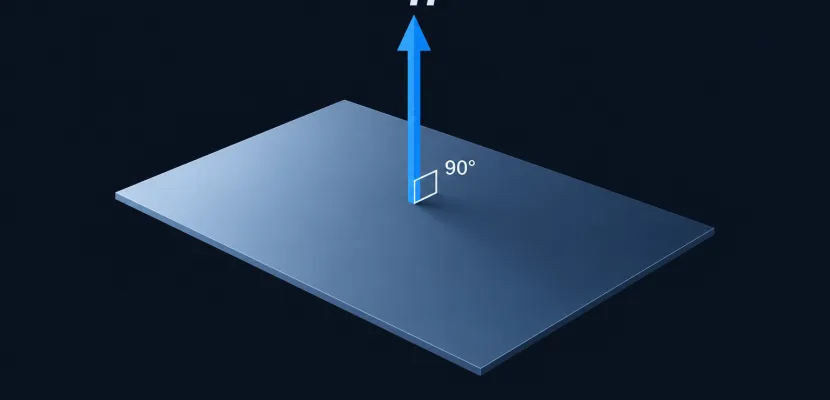
For the plane x + 2y + 2z = 5, the normal vector is (1, 2, 2). The coefficients are the answer. Most other cases take one step too: rotate a 2D direction, take a cross product of two vectors that lie in the surface, or take the gradient of a surface equation. The hard part is choosing which way the normal points, because that choice decides whether a lit 3D sketch shades correctly or renders black.
Key takeaways
- A normal is any nonzero vector perpendicular to the object. Every nonzero multiple of it is also a normal.
- Plane equation: read off (a, b, c). Three points: (Q − P) × (R − P). Level surface: ∇F.
- Swapping cross product order or vertex winding flips the normal’s sign.
- Check every answer: its dot product with any vector lying in the line or plane must be 0.
- In code, transform normals with the inverse-transpose (normal matrix), then normalize again.
Fact-checked
We checked these key facts against the sources named, on November 15, 2026:
- Most other cases take one step too: rotate a 2D direction, take a cross product of two vectors that lie in the surface, or take the gradient of a surface equation (source: mathworld.wolfram.com)
- Only to level curves and level surfaces, and only where the gradient is nonzero (source: math.libretexts.org)
How to find the normal vector: the quick answer
Pick the formula that matches what you were given, compute it, then check it with a dot product. If the normal’s dot product with every vector lying in the line, plane or surface is 0, the answer is right. You can scale it, simplify it or flip its sign. It is still a normal.
| You have | Formula | Worked example | Check | Code |
|---|---|---|---|---|
| 2D direction (dx, dy) | (−dy, dx) or (dy, −dx) | (4, −3) → (3, 4) | (3, 4)·(4, −3) = 0 | createVector(-d.y, d.x) |
| 2D line ax + by = c | (a, b) | 3x + 4y = 12 → (3, 4) | dot with direction (4, −3) = 0 | createVector(a, b) |
| Curve y = f(x) at x₀ | (−f′(x₀), 1), slope −1/f′(x₀) | y = x² at (1, 1) → (−2, 1) | dot with tangent (1, 2) = 0 | createVector(-fp, 1) |
| Plane ax + by + cz = d | (a, b, c) | x + 2y + 2z = 5 → (1, 2, 2) | dot with (0, −1, 1) = 0 | createVector(a, b, c) |
| Three points P, Q, R | (Q − P) × (R − P) | (1,1,1), (1,0,2), (3,1,0) → (1, 2, 2) | dot with both edges = 0 | p5.Vector.cross(e1, e2) |
| Level surface F(x, y, z) = k | ∇F at the point | x² + y² + z² = 14 at (1,2,3) → (2, 4, 6) | tangent plane passes through point | finite differences of F |
| Graph z = f(x, y) | (−f_x, −f_y, 1), pointing up | z = x² + y² at (1,1,2) → (−2, −2, 1) | dot with (1, 0, 2) = 0 | finite differences of f |
| Parametric surface r(u, v) | r_u × r_v | unit sphere → sin u · r | dot with r_u and r_v = 0 | cross of two partials |
| Space curve r(t) | N = T′/‖T′‖ | helix → (−cos t, −sin t, 0) | N · T = 0 | Frenet frame |
| Mesh triangle A, B, C | (B − A) × (C − A), normalized | (0,0,0), (2,0,0), (0,0,2) → (0, −1, 0) | dot with both edges = 0 | computeVertexNormals() |
A common question is whether any multiple of the cross product counts when a problem asks for “a normal vector.” It does. (1, 2, 2), (2, 4, 4) and (−1, −2, −2) are all correct. Only “the unit normal” narrows it down, and even that leaves two answers, one for each sign.
What a normal vector is (and why there are always two)
A normal vector is a nonzero vector perpendicular to a line, plane, curve or surface at a given point. If n is a normal, so is kn for any nonzero number k. That includes −n, which points the opposite way. So every point on a surface has exactly two unit normals.
Normal vs unit normal
The unit normal is the normal scaled to length 1: n̂ = n / ‖n‖. For n = (1, 2, 2), the length is √(1 + 4 + 4) = 3, so n̂ = (1/3, 2/3, 2/3).
Math problems often accept any length. Lighting code almost never does. Diffuse lighting uses the dot product of the normal with the light direction, and that only gives the cosine of the angle when both vectors have length 1.
Why direction is a choice, not a given
Geometry alone doesn’t tell you which of the two normals to use. For a closed shape you usually pick the outward one. For a graph you usually pick the upward one. For a mesh, the order of the vertices picks it for you. The “Which way does the normal point?” section below covers how to control that choice. The live sketch at the end lets you drag a segment and a triangle and watch both normals react.
Normal to a 2D line or segment
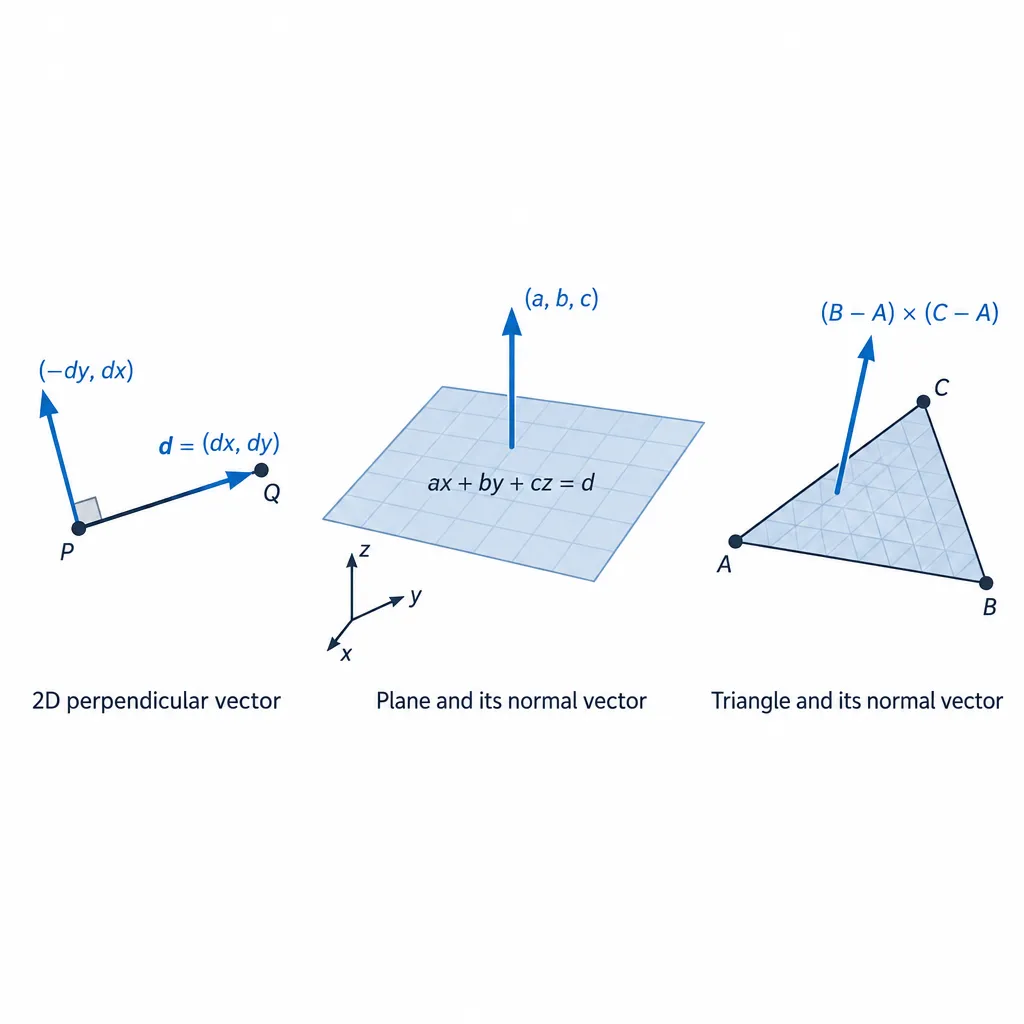
In 2D, swap the components of the direction vector and negate one of them. A segment from A to B has direction d = B − A = (dx, dy), and its two normals are (−dy, dx) and (dy, −dx).
From a direction vector
Take the segment from (1, 1) to (5, −2). Its direction is (4, −3). The normals are (3, 4) and (−3, −4). Check: (3, 4)·(4, −3) = 12 − 12 = 0. Normalize by dividing by 5 to get (0.6, 0.8).
Creative coders use this constantly: to offset outlines, extrude strokes into ribbons, or push particles off a wall.
// p5.js: draw a segment plus an outline 10 px to each side
function offsetSegment(a, b, dist) {
  const d = p5.Vector.sub(b, a);
  const n = createVector(-d.y, d.x).normalize().mult(dist);
  line(a.x + n.x, a.y + n.y, b.x + n.x, b.y + n.y); // one side
  line(a.x - n.x, a.y - n.y, b.x - n.x, b.y - n.y); // other side
}
From the line equation ax + by = c
The coefficients give the normal straight away. For 3x + 4y = 12, the normal is (3, 4). A direction along the line is (4, −3) or (−4, 3). You can confirm (4, −3) by checking that it moves you from (0, 3) to (4, 0), two points on the line.
Screen coordinates: why your “left” normal points right
In math axes (y up), (−dy, dx) rotates the direction 90° counter-clockwise, so it points to the left of travel. On a p5.js or HTML canvas, y points down. That mirrors the picture, and the same numbers now point to the right of travel.
Example: a segment moving right has d = (1, 0). Then (−dy, dx) = (0, 1). With y up, that points up, to the left. On a canvas, y = 1 is down, to the right. The math hasn’t changed. Only the drawing is mirrored. If your offset outline appears on the wrong side, use the other normal.
Equation of the normal line to a curve at a point
The normal line to y = f(x) at x₀ passes through (x₀, f(x₀)). Its slope is −1/f′(x₀), the negative reciprocal of the tangent slope. In point-slope form that is y − f(x₀) = −(1/f′(x₀))(x − x₀).
Worked example
Take y = x² at (1, 1).
- Differentiate: f′(x) = 2x, so f′(1) = 2.
- Normal slope: −1/2.
- Normal line: y − 1 = −½(x − 1), which is y = −½x + 3/2.
- Check: the slopes multiply to 2 × (−½) = −1, so the lines are perpendicular.
As a vector, the normal is (−f′(x₀), 1) = (−2, 1). Its dot product with the tangent direction (1, 2) is −2 + 2 = 0.
Edge cases
- f′(x₀) = 0. The tangent is horizontal, so the normal is vertical: x = x₀. For y = x² at (0, 0), the normal line is x = 0.
- f′(x₀) undefined because the tangent is vertical. For y = ∛x at the origin, the normal is horizontal: y = f(x₀).
- A corner such as y = |x| at 0 has no single tangent, so it has no single normal. Meshes have the same problem at hard edges, which is why flat and smooth shading exist.
Normal vector of a plane
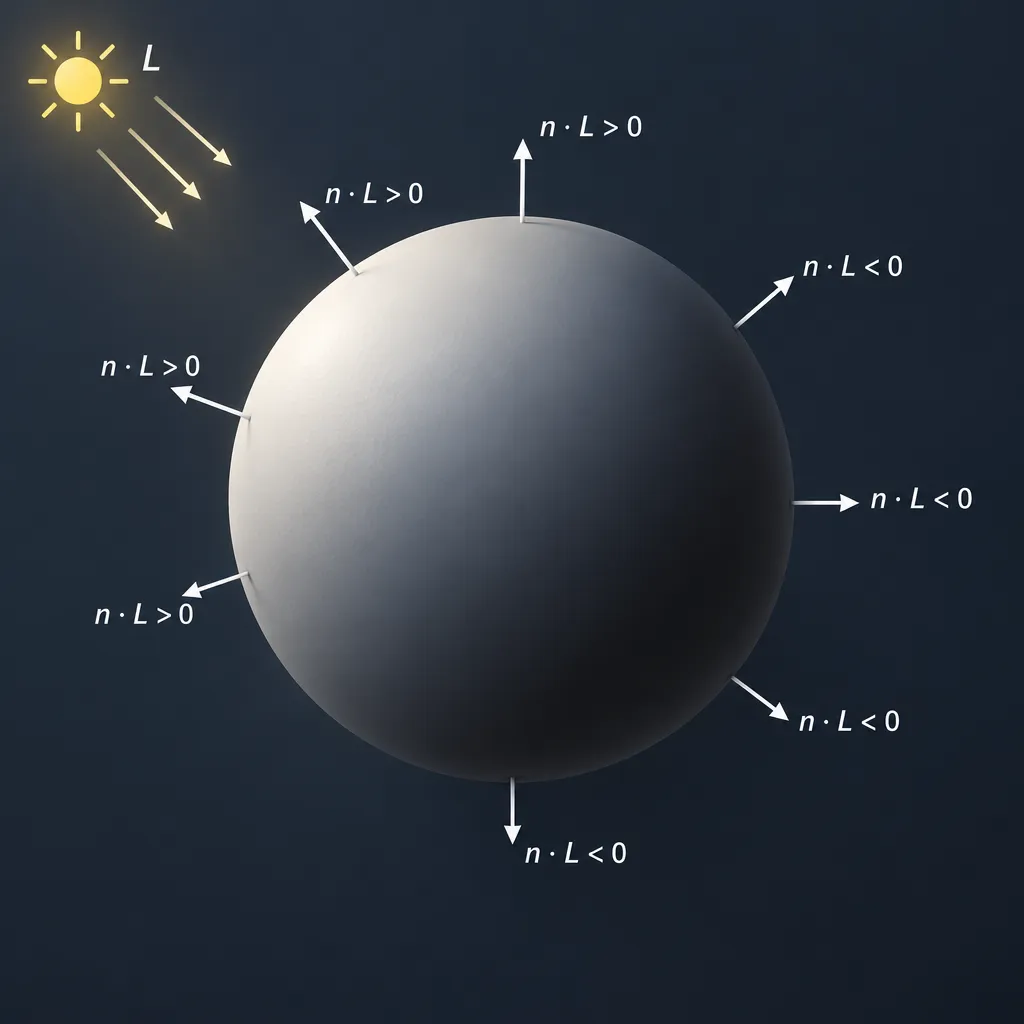
A plane given by its equation hands you the normal as its coefficients. A plane given by vectors or points needs one cross product. Mathwords’ reference puts both rules side by side: the coefficient vector of ax + by + cz = d is normal to the plane, and the cross product of any two tangent vectors in a plane is a normal.
From the plane’s equation
For ax + by + cz = d, the normal is (a, b, c). The value of d only moves the plane along that normal. For 2x − y + 5z = 7, the normal is (2, −1, 5).
From two vectors: the cross product
If u and v lie in the plane and are not parallel, then u × v is normal to it. In components:
u × v = (u₂v₃ − u₃v₂, u₃v₁ − u₁v₃, u₁v₂ − u₂v₁)
Why is it perpendicular? Expand u · (u × v) and every term cancels in pairs, leaving 0. The same happens for v. So the result is perpendicular to both vectors, and therefore to every vector in the plane they span.
This also explains a common mistake: “I subtracted two points and called it the normal, so why is my plane equation wrong?” Q − P runs between two points in the plane. It lies inside the plane, so it is a tangent vector, not a normal. You need a second edge and a cross product.
From three points, step by step
Lumen’s Calculus III text states that any three points not on one line determine a unique plane. Math Insight describes the method: cross two vectors that each join a pair of the points. Take P(1, 1, 1), Q(1, 0, 2) and R(3, 1, 0). The Axiom Academy’s worked lesson uses the same points.
Quick steps: plane through three points
- Build edges: PQ = Q − P = (0, −1, 1) and PR = R − P = (2, 0, −1).
- Cross them: PQ × PR = ((−1)(−1) − (1)(0), (1)(2) − (0)(−1), (0)(0) − (−1)(2)) = (1, 2, 2).
- Point-normal form: 1(x − 1) + 2(y − 1) + 2(z − 1) = 0.
- Simplify: x + 2y + 2z = 5.
- Check: P gives 1 + 2 + 2 = 5, Q gives 1 + 0 + 4 = 5, R gives 3 + 2 + 0 = 5.
The dot checks also hold: (1, 2, 2)·(0, −1, 1) = 0 and (1, 2, 2)·(2, 0, −1) = 0.
Studio tip
Always check your normal: dot it with two vectors that lie in the plane or surface. Both results must be 0, or very close to 0 in floating-point code.
When it fails: collinear points and the zero vector
If the cross product comes out (0, 0, 0), your two vectors are parallel. In other words, your three points lie on one line. Example: (0, 0, 0), (1, 1, 1) and (2, 2, 2) give edges (1, 1, 1) and (2, 2, 2), and their cross product is zero. Infinitely many planes contain that line, so there is no unique normal.
In mesh code this happens with degenerate “sliver” triangles. Normalizing a zero vector then divides by zero and produces NaN, which can spread black pixels across a smooth-shaded mesh. Skip or weld those triangles before computing normals.
Which way does the normal point?
The cross product’s direction comes from operand order. For a mesh, that order is the vertex winding. Swap the order and the normal flips. Pick the order on purpose and you control whether a face points toward the camera.
The right-hand rule
Point the fingers of your right hand along a, curl them toward b, and your thumb points along a × b. With the standard axes, x̂ × ŷ = ẑ. This holds for the math convention: a right-handed system with x right, y up and z toward you.
Order and winding flip the sign
The cross product is anticommutative: b × a = −(a × b). That answers a frequent forum question: “Why do I get the same normal but with the sign inverted when I reverse the vertex order?” Reversing the order swaps the two edge vectors, and that negates the result.
| Change | Effect on normal | Source |
|---|---|---|
| a × b becomes b × a | Negated | Anticommutativity of the cross product |
| Swap two vertices (B ↔ C) | Negated | Same rule: the two edges swap |
| Cycle vertices (A, B, C → B, C, A) | Unchanged | Cyclic order keeps the winding |
| Scale one edge by k > 0 | Longer or shorter, same direction | Linearity of the cross product |
| Scale one edge by k < 0 | Negated | Linearity of the cross product |
| Mirror the mesh (negative scale on one axis) | Winding appears reversed | A reflection swaps CCW and CW |
| Left-handed vs right-handed axes | Same numbers, opposite on-screen look | Handedness of the coordinate system |
So “My face normal points the wrong way when I use B − A and C − A. Which order is right?” has a precise answer. (B − A) × (C − A) points toward a viewer who sees A → B → C counter-clockwise, in a right-handed system. WebGL treats counter-clockwise triangles as front faces by default, and so do three.js materials. If your normal points the wrong way, your triangles are wound clockwise from the side you want lit.
Handedness of your coordinate system
Does the right-hand rule still work in a left-handed system such as Unity’s? The formula is identical. Only the picture changes: in a left-handed system the result points the way your left hand predicts. The numbers stay the same.
p5.js’s WEBGL mode puts x right and y down, with +z toward the default camera. On screen that behaves like a mirrored system. A triangle that looks clockwise in p5.js has a (B − A) × (C − A) with positive z, pointing at the camera. The live sketch below demonstrates exactly this.
Choosing outward or upward on purpose
- Closed surfaces: choose outward normals. For a sphere centred at the origin, the outward normal at point p is p itself.
- Graphs and terrain: choose the normal with a positive vertical component.
- Meshes: wind every triangle the same way as seen from outside. Fix the winding once at the source, not in the shader.
Studio tip
If your lighting looks inside-out, either swap two vertices in each triangle (B ↔ C) or negate the normal. Never do both, or they will disagree again.
Normal to a surface
For a surface written as F(x, y, z) = k, the normal is the gradient ∇F at the point. For a graph z = f(x, y), it is (−f_x, −f_y, 1). For a parametric surface r(u, v), it is r_u × r_v.
Level surfaces: the gradient
Paul’s Online Math Notes (Calculus III, §14.2) shows that for a level surface f(x, y, z) = constant, the gradient vector at a point is normal to the tangent plane there. The gradient is ∇F = (F_x, F_y, F_z).
Worked example: the sphere x² + y² + z² = 14 at (1, 2, 3). First check that the point is on the surface: 1 + 4 + 9 = 14. Then ∇F = (2x, 2y, 2z) = (2, 4, 6), which you can simplify to (1, 2, 3).
Is the gradient always the normal vector? Only for level surfaces (or level curves in 2D), and only where ∇F ≠ 0. For the cone x² + y² − z² = 0, the gradient at the tip is (0, 0, 0). No normal exists there.
Studio tip
Simplify before you use a normal: (2, 4, 6) and (1, 2, 3) point the same way. Dividing out common factors gives cleaner plane equations.
Graphs z = f(x, y)
Rewrite the graph as F = f(x, y) − z = 0. Then ∇F = (f_x, f_y, −1), which points down. Negate it to get the upward normal (−f_x, −f_y, 1).
For z = x² + y² at (1, 1, 2): f_x = 2 and f_y = 2, so the upward normal is (−2, −2, 1). Check it against the tangent vector (1, 0, f_x) = (1, 0, 2): −2 + 0 + 2 = 0.
This is the formula behind lighting a noise terrain. When the height comes from Perlin noise (see our Perlin noise tutorial), you rarely have f_x in closed form. Estimate it with central differences, f_x ≈ (f(x + h, y) − f(x − h, y)) / 2h, and do the same for f_y.
Parametric surfaces: r_u × r_v
Generative surfaces are usually written as r(u, v). The partial derivatives r_u and r_v are tangent vectors, so their cross product is normal.
For the unit sphere r(u, v) = (sin u cos v, sin u sin v, cos u):
- r_u = (cos u cos v, cos u sin v, −sin u)
- r_v = (−sin u sin v, sin u cos v, 0)
- r_u × r_v = sin u · (sin u cos v, sin u sin v, cos u) = sin u · r
For 0 < u < π this points outward. At the poles (u = 0 and u = π) it equals zero, because r_v vanishes there. Those are singular points of the parametrisation, not of the sphere. In code, guard against them or a pole vertex gets a NaN normal.
Tangent plane and normal line
With normal n = (a, b, c) at point (x₀, y₀, z₀):
- Tangent plane: a(x − x₀) + b(y − y₀) + c(z − z₀) = 0
- Normal line: (x, y, z) = (x₀, y₀, z₀) + t(a, b, c)
For the sphere example, the tangent plane is x + 2y + 3z = 14, and the normal line is (1 + t, 2 + 2t, 3 + 3t). That line passes through the origin at t = −1, as a sphere’s normal should.
The principal unit normal of a 3D curve
A space curve has infinitely many perpendicular directions at each point. The principal unit normal picks one: the direction the curve is turning. OpenStax Calculus Volume 3 (§3.3, Arc Length and Curvature) defines it as N(t) = T′(t) / ‖T′(t)‖, where T(t) = r′(t) / ‖r′(t)‖ is the unit tangent.
Formula and worked helix
Take the helix r(t) = (cos t, sin t, t).
- r′(t) = (−sin t, cos t, 1), with length √2.
- T(t) = (1/√2)(−sin t, cos t, 1).
- T′(t) = (1/√2)(−cos t, −sin t, 0), with length 1/√2.
- N(t) = (−cos t, −sin t, 0).
N points horizontally toward the helix’s axis, which is where the curve bends. Check: N · T = (1/√2)(sin t cos t − sin t cos t + 0) = 0.
The difference between a normal vector and a tangent vector is exactly this: T points along the curve, and N is perpendicular to it. N(t) is undefined wherever T′ = 0, which happens on straight segments.
Frenet frame for ribbons and tubes
The binormal B = T × N completes a right-handed set of perpendicular unit vectors. Lumen’s Calculus III text calls T, N and B together the Frenet frame. For the helix, B(t) = (1/√2)(sin t, −cos t, 1).
In code, this frame lets you sweep a shape along a path. Place a circle in the N–B plane at each sample and you get a tube. Place a line segment along N and you get a ribbon. three.js builds its TubeGeometry frames through Curve.computeFrenetFrames(). The pure Frenet frame can twist suddenly at inflection points, which is a known trade-off for hand-rolled sweeps.
Normals in code: p5.js and three.js
A renderer needs one normal per vertex. You can compute face normals with a cross product and average them, or let the library do it. Both p5.js and three.js are free and open source.
Face normal of a triangle
// Face normal of triangle A, B, C as plain [x, y, z] arrays
function faceNormal(A, B, C) {
  const e1 = [B[0] - A[0], B[1] - A[1], B[2] - A[2]];
  const e2 = [C[0] - A[0], C[1] - A[1], C[2] - A[2]];
  const n = [
    e1[1] * e2[2] - e1[2] * e2[1],
    e1[2] * e2[0] - e1[0] * e2[2],
    e1[0] * e2[1] - e1[1] * e2[0]
  ];
  const len = Math.hypot(n[0], n[1], n[2]);
  if (len === 0) return [0, 0, 0]; // degenerate triangle
  return [n[0] / len, n[1] / len, n[2] / len];
}

faceNormal([0, 0, 0], [2, 0, 0], [0, 0, 2]); // [0, -1, 0]: faces down
faceNormal([0, 0, 0], [0, 0, 2], [2, 0, 0]); // [0, 1, 0]: B and C swapped, faces up
Flat vs smooth shading
A face normal belongs to the whole triangle. A vertex normal belongs to one corner. Flat shading gives every corner of a triangle its face normal, so the facets show. Smooth shading gives a shared vertex the average of its neighbouring face normals. The renderer then interpolates across each triangle, which hides the facets.
Hard edges, like the corners of a cube, need duplicated vertices so each side keeps its own normal. Smooth curves need shared vertices. Many “why is my cube blobby?” questions come down to this choice.
p5.js: normal(), computeNormals()
The p5.js reference says normal() sets the normal for vertices in a custom shape. You call it between beginShape() and endShape(), and it applies to every following vertex until you call it again. It accepts normal(x, y, z) or a p5.Vector.
// p5.js WEBGL: one triangle with an explicit normal facing the camera
beginShape(TRIANGLES);
normal(0, 0, 1);
vertex(-50, -50, 0);
vertex(50, -50, 0);
vertex(0, 50, 0);
endShape();
For p5.Geometry, computeNormals() works out face normals and then vertex normals. Its modes changed between major versions:
| Mode | p5.js 1.x behavior | p5.js 2.x behavior | Use it for |
|---|---|---|---|
| FLAT | Default. Uses vertices as given | Deprecated, acts like KEEP_CONNECTIONS | Legacy sketches only |
| KEEP_CONNECTIONS | Not available | Default. Keeps existing vertex sharing | Most custom geometry |
| SMOOTH | Shared vertices are reused | Groups vertices at approximately matching positions | Organic, curved forms |
| SEGMENTED | Not available | One face normal per triangle, true flat shading | Low-poly, faceted looks |
// p5.js: build a shape once, then smooth its normals
let shape;
function setup() {
  createCanvas(400, 400, WEBGL);
  shape = buildGeometry(() => {
    sphere(120, 8, 6); // low-poly on purpose
  });
  shape.computeNormals(SMOOTH, { roundToPrecision: 2 });
}
function draw() {
  background(20);
  lights();
  orbitControl();
  model(shape);
}
“computeNormals(SMOOTH) leaves seams on my geometry. Why?” There are two likely causes. The roundToPrecision option, 3 decimal places by default, decides which positions count as the same vertex. Vertices that differ beyond that precision don’t merge, so lower the value. Separately, GitHub issue #6590 reported seams around coordinates close to 0, and PR #6591 fixed it. If you’re on an old 1.x build, update.
The current reference also notes that the vertexNormals property is planned for removal in p5.js 3.0, with geometry data moving to a “parts” API. Prefer computeNormals() over editing that array by hand.
Did you know?
In p5.js 2.x, the reference marks computeNormals(FLAT) as deprecated: it now behaves like KEEP_CONNECTIONS. Truly faceted shading comes from SEGMENTED.
three.js: computeVertexNormals()
According to the three.js API documentation, BufferGeometry.computeVertexNormals() gives each vertex of an indexed geometry the average of the face normals around it. For non-indexed geometry, each vertex simply gets its own face’s normal. That makes index sharing the switch between smooth and flat results.
import * as THREE from 'three';

// One non-indexed triangle, wound to face +y
const geometry = new THREE.BufferGeometry();
const positions = new Float32Array([
  0, 0, 0,
  0, 0, 2,
  2, 0, 0
]);
geometry.setAttribute('position', new THREE.BufferAttribute(positions, 3));
geometry.computeVertexNormals();
console.log(geometry.getAttribute('normal').array); // 0, 1, 0 for each vertex
“Why are my faces black with a lit material on my BufferGeometry?” The three.js manual’s custom BufferGeometry chapter answers it: lit materials need normals, and computeVertexNormals() exists for when you don’t supply them. To debug, swap in MeshNormalMaterial (or normalMaterial() in p5.js). Both colour each pixel by its normal direction, using the same 0.5·n + 0.5 colour encoding covered in our article on normal map range.
“Does computeVertexNormals use weighted normals?” No. A three.js forum thread that checked the source found no area or angle weighting. If you need weighted normals, for example on meshes with very uneven triangle sizes, compute them yourself. Use the cross product before normalizing: its length is twice the triangle’s area, so summing raw cross products gives area weighting for free.
Did you know?
A three.js forum check of the source found that computeVertexNormals() takes a plain average of neighbouring face normals. A huge triangle and a sliver count equally at a shared vertex.
Transforming normals: the normal matrix
When the model matrix includes non-uniform scale, transform normals with the inverse-transpose of its upper 3×3, then renormalize. Song Ho Ahn’s OpenGL notes derive this and work through a scaling example with the normal (0, 0.6, 0.8).
Scale that normal by (2, 4, 5) with the model matrix and you get (0, 2.4, 4.0). Normalized, that is about (0, 0.51, 0.86), which tilts away from the scaled surface. The inverse-transpose scales by (1/2, 1/4, 1/5) instead, giving (0, 0.15, 0.16), or about (0, 0.68, 0.73) after normalizing. That is the correct direction.
“Do I really need transpose(inverse(model)) for normals, or can I skip it?” You can skip it for a pure rotation, because the inverse-transpose of a rotation matrix is that same rotation, so the normal matrix reduces to the rotation. You can also skip it for uniform scale, as long as you renormalize the transformed normal. Anything else needs it.
// GLSL ES 1.00 vertex shader; names follow p5.js 1.x built-in uniforms
attribute vec3 aPosition;
attribute vec3 aNormal;
uniform mat4 uModelViewMatrix;
uniform mat4 uProjectionMatrix;
uniform mat3 uNormalMatrix; // inverse-transpose of the model-view 3x3
varying vec3 vNormal;

void main() {
  vNormal = normalize(uNormalMatrix * aNormal);
  gl_Position = uProjectionMatrix * uModelViewMatrix * vec4(aPosition, 1.0);
}
In the fragment shader, write vec3 n = normalize(vNormal); again. Interpolating between unit vectors shortens them. three.js supplies the same matrix to shaders as normalMatrix.
Heads up
A negative scale on one axis mirrors the mesh and reverses its apparent winding. Some engines detect this and compensate, but hand-written WebGL does not.
Troubleshooting: black faces, inside-out meshes, wrong reflections
Most shading bugs trace back to missing normals, reversed winding or an untransformed normal. Match your symptom to the table, then fix it at the source.
| Symptom | Likely cause | Fix |
|---|---|---|
| Whole mesh black under a lit material | No normal attribute | Call computeVertexNormals() or computeNormals(), or supply normals |
| Some faces black, others fine | Mixed winding across triangles | Rewind the bad triangles consistently (CCW from outside) |
| Lit from inside, dark outside | Every normal flipped | Swap B ↔ C in every triangle or negate normals, not both |
| Lighting inside out after a mirror | Negative scale reversed the winding | Flip the winding or normals for mirrored instances |
| Highlights slide or skew on stretched objects | Non-uniform scale without the normal matrix | Use the inverse-transpose, then renormalize |
| Lighting too bright or too dim | Normals not unit length | Normalize after every transform and after interpolation |
| Black speckles on smooth meshes | Degenerate triangles produce NaN | Remove zero-area triangles before computing normals |
| Cube looks blobby | Shared vertices averaged across hard edges | Duplicate edge vertices or use SEGMENTED in p5.js 2.x |
| Faces vanish instead of going dark | Back-face culling or depth issues, not normals | Check the cull side and depth testing settings |
Two-sided rendering does not fix black faces. A Panda3D forum discussion of flipped objects explains why: the back faces get drawn, but their normals still point away from the light, so they stay dark. Fix the normals instead.
Practice problems with answers
Each problem uses a different case from the decision table. Work it out first, then compare with the answers below.
- Find a normal to the line 2x − 5y = 7.
- Find the normal line to y = x³ at (1, 1).
- Find the plane through A(1, 0, 0), B(0, 2, 0) and C(0, 0, 3).
- Find the unit normal to the ellipsoid x² + 2y² + 3z² = 6 at (1, 1, 1).
- A triangle has A(0, 0, 0), B(2, 0, 0) and C(0, 0, 2). Which way does (B − A) × (C − A) point, and how do you make it face +y?
Answers
- (2, −5). Check with direction (5, 2): 10 − 10 = 0.
- f′(1) = 3, so the normal slope is −1/3: y − 1 = −(1/3)(x − 1). Check: 3 × (−1/3) = −1.
- AB = (−1, 2, 0) and AC = (−1, 0, 3). Their cross product is (6, 3, 2), so the plane is 6x + 3y + 2z = 6. Check: (6, 3, 2)·(−1, 2, 0) = 0 and (6, 3, 2)·(−1, 0, 3) = 0. B and C both give 6.
- ∇F = (2x, 4y, 6z) = (2, 4, 6), which simplifies to (1, 2, 3). The unit normal is (1, 2, 3)/√14, and the tangent plane is x + 2y + 3z = 6.
- (2, 0, 0) × (0, 0, 2) = (0, −4, 0), so it points down (−y). Swap B and C: (0, 0, 2) × (2, 0, 0) = (0, 4, 0), which faces +y.
FAQ
How do you find the normal vector of a plane?
If the plane is written as ax + by + cz = d, the normal is (a, b, c). If you have two non-parallel vectors in the plane, their cross product is the normal.
How do you find the normal vector from three points?
Subtract to get two edges, Q − P and R − P, then take their cross product. Confirm that the result is nonzero and that its dot product with both edges is 0.
How do you find the equation of the normal at a point?
For a curve y = f(x), use slope −1/f′(x₀) through (x₀, f(x₀)). For a surface, use the normal line (x₀, y₀, z₀) + t·n.
How do you find the normal to a surface?
Use ∇F for F(x, y, z) = k, (−f_x, −f_y, 1) for z = f(x, y), or r_u × r_v for a parametric surface r(u, v).
How do you find the unit normal vector?
Divide the normal by its length. (1, 2, 2) has length 3, so its unit normal is (1/3, 2/3, 2/3).
Is the gradient always the normal vector?
Only to level curves and level surfaces, and only where the gradient is nonzero. A curve y = f(x) has a normal at differentiable points, such as (−f′(x), 1), and rewriting it as F(x, y) = y − f(x) = 0 is one way to get it from the gradient.
How do you know which direction the normal vector points?
Use the right-hand rule on the cross product order. For meshes, a counter-clockwise winding seen from outside gives an outward normal in a right-handed system. Swapping the order flips it.
What is the difference between a normal vector and a tangent vector?
A tangent vector lies along the curve or surface. A normal is perpendicular to it. Their dot product is 0.
How do you find the principal unit normal vector N(t)?
Compute T(t) = r′/‖r′‖, differentiate it, then normalize: N(t) = T′(t)/‖T′(t)‖.
How do you find a normal vector in 2D?
For direction (dx, dy), use (−dy, dx) or (dy, −dx). For a line ax + by = c, use (a, b).
Try it live
Drag the blue dots to move a segment and watch both 2D normals and the offset outlines follow. Drag the orange dots to reshape triangle A, B, C. The readout shows the z component of (B − A) × (C − A) and how the winding sets its sign on a y-down canvas. Once this behaves the way you expect, take it into 3D: build a triangle in WEBGL mode, wind it on purpose, and confirm the result with normalMaterial() before you add lights.
// Normals playground: drag the dots.
// Blue dots move a segment, orange dots reshape triangle A, B, C.
let pts = [];
let dragging = -1;

function setup() {
  createCanvas(720, 480);
  pts = [
    createVector(80, 320), createVector(300, 180),   // segment ends
    createVector(420, 360), createVector(650, 340),  // triangle A, B
    createVector(540, 140)                           // triangle C
  ];
  textFont('monospace');
  textSize(13);
}

function draw() {
  background(250);
  drawSegment(pts[0], pts[1]);
  drawTriangle(pts[2], pts[3], pts[4]);
  // draw the draggable handles
  noStroke();
  for (let i = 0; i < pts.length; i++) {
    fill(i < 2 ? color(40, 110, 220) : color(240, 140, 30));
    circle(pts[i].x, pts[i].y, 14);
  }
  fill(30);
  text('Drag the dots. Canvas y points down, so left and right look mirrored.', 16, 24);
}

function drawSegment(a, b) {
  let d = p5.Vector.sub(b, a);
  // the two normals of direction (dx, dy)
  let n1 = createVector(-d.y, d.x).normalize();
  let n2 = createVector(d.y, -d.x).normalize();
  let mid = p5.Vector.add(a, b).mult(0.5);
  stroke(40, 110, 220);
  strokeWeight(3);
  line(a.x, a.y, b.x, b.y);
  // offset outlines 20 px along each normal
  strokeWeight(1);
  stroke(40, 110, 220, 100);
  line(a.x + n1.x * 20, a.y + n1.y * 20, b.x + n1.x * 20, b.y + n1.y * 20);
  line(a.x + n2.x * 20, a.y + n2.y * 20, b.x + n2.x * 20, b.y + n2.y * 20);
  arrow(mid, n1, 60, color(200, 40, 60), '(-dy, dx)');
  arrow(mid, n2, 60, color(30, 150, 90), '(dy, -dx)');
}

function drawTriangle(a, b, c) {
  // treat the canvas as the plane z = 0 and take the z part of (B-A) x (C-A)
  let e1 = p5.Vector.sub(b, a);
  let e2 = p5.Vector.sub(c, a);
  let z = e1.x * e2.y - e1.y * e2.x;
  let flat = abs(z) < 50;
  stroke(60);
  strokeWeight(1.5);
  fill(z > 0 ? color(255, 220, 160) : color(190, 205, 235));
  triangle(a.x, a.y, b.x, b.y, c.x, c.y);
  noStroke();
  fill(30);
  text('A', a.x + 10, a.y + 18);
  text('B', b.x + 10, b.y + 18);
  text('C', c.x + 10, c.y - 10);
  // symbol at the centre: dot = normal toward you, cross = away from you
  let cx = (a.x + b.x + c.x) / 3;
  let cy = (a.y + b.y + c.y) / 3;
  stroke(30);
  strokeWeight(2);
  noFill();
  circle(cx, cy, 26);
  if (!flat && z > 0) {
    fill(30);
    circle(cx, cy, 6);
  } else if (!flat) {
    line(cx - 7, cy - 7, cx + 7, cy + 7);
    line(cx - 7, cy + 7, cx + 7, cy - 7);
  }
  noStroke();
  fill(30);
  let msg = 'collinear points: zero normal';
  if (!flat && z > 0) msg = 'clockwise on screen: +z, faces you';
  if (!flat && z < 0) msg = 'counter-clockwise on screen: -z, away';
  text('z of (B-A)x(C-A) = ' + round(z), 330, 440);
  text(msg, 330, 460);
}

function arrow(base, dir, len, col, label) {
  let tip = p5.Vector.add(base, p5.Vector.mult(dir, len));
  stroke(col);
  strokeWeight(2);
  line(base.x, base.y, tip.x, tip.y);
  // small arrowhead pointing along dir
  push();
  translate(tip.x, tip.y);
  rotate(dir.heading());
  noStroke();
  fill(col);
  triangle(0, 0, -10, -5, -10, 5);
  pop();
  noStroke();
  fill(col);
  text(label, tip.x + 8, tip.y + 4);
}

function mousePressed() {
  for (let i = 0; i < pts.length; i++) {
    if (dist(mouseX, mouseY, pts[i].x, pts[i].y) < 14) {
      dragging = i;
      return;
    }
  }
}

function mouseDragged() {
  if (dragging >= 0) {
    pts[dragging].set(constrain(mouseX, 0, width), constrain(mouseY, 0, height));
  }
}

function mouseReleased() {
  dragging = -1;
}
On this article
- Facts were checked against the sources below before publication.
- Published
Sources (8)
- Paul's Online Notes: Gradient Vector, Tangent Planes and Normal Lines (tutorial.math.lamar.edu)
- Mathwords: Normal Vector (mathwords.com)
- Math Insight: Forming planes (mathinsight.org)
- Lumen Calculus III: Equations for a Plane in Space (courses.lumenlearning.com)
- Finding the plane through P(1,1,1), Q(1,0,2), R(3,1,0) (theaxiomacademy.org)
- OpenStax Calculus Volume 3, 3.3 Arc Length and Curvature (openstax.org)
- Lumen Calculus III: The Normal and Binormal Vectors (courses.lumenlearning.com)
- p5.js reference: normal() (p5js.org)