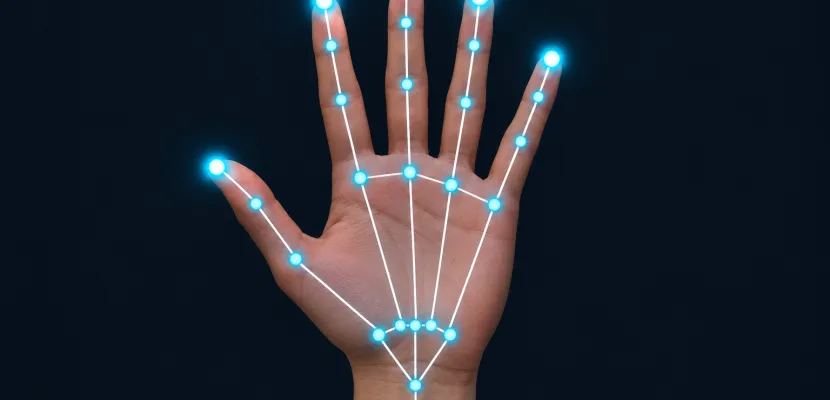
From an ordinary webcam frame, a handpose model gives you 21 points per hand: the wrist, plus four joints on each finger. In a browser the quickest way to get them is ml5.js handPose inside a p5.js sketch, which runs Google MediaPipe’s hand model with about ten lines of setup. This guide covers the keypoint map, how the model works, which tool fits which job, working code for p5.js 1.x and 2.x, gesture recipes, and fixes for the bugs people hit most.
Key takeaways
- Every major handpose tool outputs the same 21 keypoints, and the fingertips are always 4, 8, 12, 16 and 20.
- ml5.js handPose is the fastest route in a browser. MediaPipe Hand Landmarker is the most portable for production.
- On p5.js 2.x,
ml5.handPose()returns a promise, so await it in an asyncsetup(). - Measure gestures against hand size (wrist 0 to middle MCP 9), or they break when the hand moves closer to or further from the camera.
- The Ultralytics Hand Keypoints dataset is CC BY-NC-SA 4.0, so you can’t train on it for paid commercial work.
Fact-checked
We checked these key facts against the sources named, on November 15, 2026:
- CMU’s OpenPose project, which predates MediaPipe Hands, also published a 21-point hand keypoint detector (source: github.com)
- The TensorFlow blog’s November 2021 announcement points out that the original TensorFlow.js HandPose model could track only one hand at a time (source: blog.tensorflow.org)
- It’s the general task, and it was also the name of TensorFlow.js’s first hand model (source: github.com)
- On video, the second stage tracks the hand from frame to frame, so the slow first stage rarely has to run (source: ai.googleblog.com)
- According to Google’s MediaPipe Hand Landmarker documentation, in VIDEO and LIVE_STREAM modes the palm detector runs again only when the landmark model loses track of the hand (source: ai.google.dev)
What is handpose? Hand pose estimation in one minute
Hand pose estimation finds the positions of a hand’s joints in an image or video frame. “Handpose” refers to two things. It’s the general task, and it was also the name of TensorFlow.js’s first hand model. Today it usually means 21 landmarks per hand from a single RGB camera, with no depth sensor or gloves, running in real time on a laptop or phone.
The output is a skeleton, not a picture. You get a list of points with coordinates, a confidence score and a left or right label. Everything else is code you write on top of those numbers: gestures, pinch-to-draw, a theremin you play in the air. That’s why the task suits human-computer interaction and interactive art so well.
2D keypoints vs 3D landmarks vs hand meshes
Hand models produce three kinds of output, and they differ in how much they tell you about depth.
| Output type | What you get | Typical source | Good for |
|---|---|---|---|
| 2D keypoints | 21 points as (x, y) in image pixels | ml5.js keypoints, YOLO26-pose |
Drawing over video, pinch and swipe gestures |
| 3D landmarks | 21 points as (x, y, z), with z as relative depth or hand-centred metric units | ml5.js keypoints3D, MediaPipe world landmarks |
Gesture recognition that ignores rotation, avatars |
| Hand mesh | A full surface model, usually MANO with 778 vertices | Research pipelines | Animation, AR occlusion, grasp analysis |
MANO is a parametric hand model from 2017 research. It describes the whole hand surface with a small set of shape and pose parameters. Most creative coding work never needs it. Keypoints are enough for interaction, and they run much faster.
Where the name “handpose” comes from (TF.js → MediaPipe → ml5.js)
The name follows the history of a few related libraries:
- @tensorflow-models/handpose. The original TensorFlow.js HandPose model predicted 21 keypoints from MediaPipe’s hand research but could only detect one hand at a time.
- @tensorflow-models/hand-pose-detection. In November 2021 the TensorFlow blog introduced this successor. It wraps MediaPipe Hands, offers a
mediapipeortfjsruntime and lite or full models, detects several hands and returns 3D keypoints. - ml5.js. The beginner-friendly ml5.js library wrapped the old model as
ml5.handpose(lowercase) in its 0.x versions. ml5.js 1.x, the “next-gen” rewrite, renamed itml5.handPose(camelCase) and built it on the newer detector. - MediaPipe Hand Landmarker. This is Google’s current task API for the same model family, with packages for web, Python, Android and iOS.
Did you know?
The TensorFlow blog’s November 2021 announcement points out that the original TensorFlow.js HandPose model could track only one hand at a time. Two-hand tracking in the browser came with its MediaPipe Hands-based successor.
The 21 hand keypoints, mapped
Every major handpose tool returns the same 21 points in the same order. This includes ml5.js, MediaPipe, TF.js and YOLO trained on the Ultralytics dataset. Point 0 is the wrist, and each finger then gets four points running from the palm to the tip. Remember 4, 8, 12, 16, 20: those are the fingertips, from thumb to pinky.
              8   12  16  20        tips (TIP)
              |   |   |   |
              7   11  15  19        DIP joints
         4    |   |   |   |
         |    6   10  14  18        PIP joints
         3    |   |   |   |
          \   5---9---13--17        knuckles (MCP)
           2   \     |    /
            \   \    |   /
             1   \   |  /
              \___\  | /
                    0               wrist
| Index | Name (ml5 / TF.js) | Finger | Joint |
|---|---|---|---|
| 0 | wrist | none | Wrist |
| 1 | thumb_cmc | Thumb | CMC (base of thumb) |
| 2 | thumb_mcp | Thumb | MCP |
| 3 | thumb_ip | Thumb | IP |
| 4 | thumb_tip | Thumb | Tip |
| 5 | index_finger_mcp | Index | MCP (knuckle) |
| 6 | index_finger_pip | Index | PIP |
| 7 | index_finger_dip | Index | DIP |
| 8 | index_finger_tip | Index | Tip |
| 9 | middle_finger_mcp | Middle | MCP |
| 10 | middle_finger_pip | Middle | PIP |
| 11 | middle_finger_dip | Middle | DIP |
| 12 | middle_finger_tip | Middle | Tip |
| 13 | ring_finger_mcp | Ring | MCP |
| 14 | ring_finger_pip | Ring | PIP |
| 15 | ring_finger_dip | Ring | DIP |
| 16 | ring_finger_tip | Ring | Tip |
| 17 | pinky_finger_mcp | Pinky | MCP |
| 18 | pinky_finger_pip | Pinky | PIP |
| 19 | pinky_finger_dip | Pinky | DIP |
| 20 | pinky_finger_tip | Pinky | Tip |
Two shortcuts come out of this layout. For any finger f from 1 (index) to 4 (pinky), the tip is at 4 * f + 4 and the PIP joint is at 4 * f + 2. Points 0 and 9 also give a steady measure of hand size, because the palm doesn’t change shape when the fingers move.
Joint naming: CMC, MCP, PIP, DIP, TIP
The joint names come from anatomy. They matter because gesture rules depend on comparing joints.
- CMC (carpometacarpal): where the thumb’s metacarpal bone meets the wrist. Only the thumb gets a CMC keypoint.
- MCP (metacarpophalangeal): the knuckle where each finger joins the palm.
- PIP (proximal interphalangeal): the first joint up the finger. The thumb has no PIP.
- IP (interphalangeal): the thumb’s single middle joint.
- DIP (distal interphalangeal): the joint closest to the tip.
- TIP: the fingertip itself. It’s an estimated point, not a joint.
So the thumb is “shorter” in the data (CMC, MCP, IP, tip) while the other fingers run MCP, PIP, DIP, tip. Both have four points, which keeps the indexing regular.
Reading handedness correctly with a mirrored webcam
Each prediction carries a handedness label, “Left” or “Right”. Whether it matches your real hand depends on whether the image the model saw was mirrored. MediaPipe’s documentation for its older Hands solution says handedness assumes a mirrored, selfie-style image. If your pipeline mirrors in a different place, the labels flip.
There’s a quick check that never fails. Raise only your right hand and print hand.handedness. If it says “Left”, swap the labels in your code once and move on. Don’t build gesture logic until you’ve done this check, because two-hand interactions depend on it.
How handpose models work
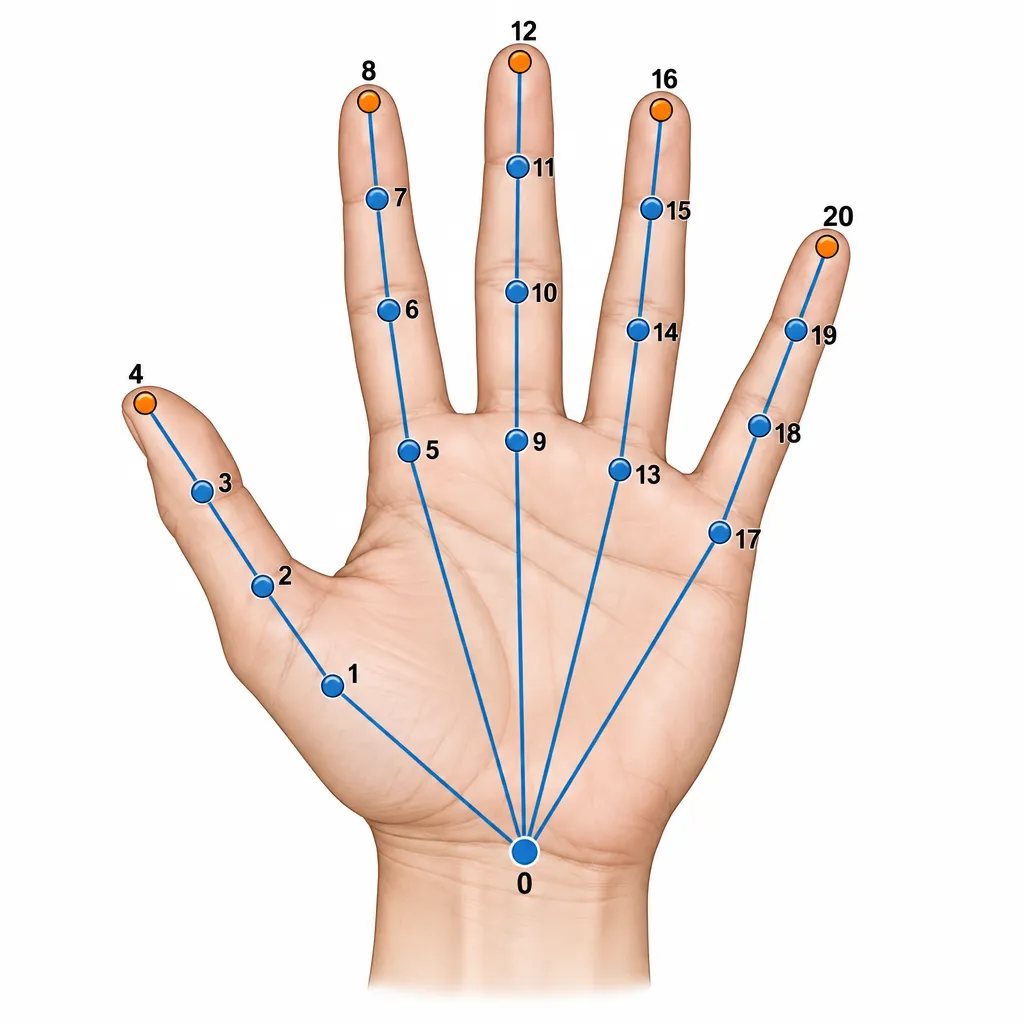
Modern handpose models run in two stages. A palm detector finds a box around each hand, then a landmark model reads the 21 points from the cropped box. On video, the second stage tracks the hand from frame to frame, so the slow first stage rarely has to run.
Google’s MediaPipe documentation describes the Hand Landmarker model bundle as exactly this pair: a palm detection model plus a hand landmarks model. The landmark model estimates 21 knuckle keypoints. It was trained on about 30K real-world images plus synthetic hand renders placed over different backgrounds.
The detector looks for palms, not whole hands, and this is deliberate. A palm is a fairly rigid, square-ish shape, while fingers bend into endless poses. Detecting the rigid part first and leaving the hard part to a focused second model is what makes the system fast enough for phones.
Did you know?
According to Google’s MediaPipe Hand Landmarker documentation, in VIDEO and LIVE_STREAM modes the palm detector runs again only when the landmark model loses track of the hand. On most frames, only the landmark model runs.
That tracking shortcut explains a lot of behaviour people see. A hand entering the frame takes a moment to be “found”. Once found, it follows fast motion well. When it’s lost, often after it crossed the other hand, it can take a few frames to come back.
Detection vs tracking confidence
MediaPipe Hand Landmarker exposes three thresholds, and each defaults to 0.5:
| Setting | Controls | Raise it when | Lower it when |
|---|---|---|---|
min_hand_detection_confidence |
How sure the palm detector must be to report a new hand | Faces or knees get detected as hands | Hands in dim light are never found |
min_hand_presence_confidence |
How sure the landmark model must be that a hand is still in the crop | Ghost hands linger after you pull away | Tracking drops during fast gestures |
min_tracking_confidence |
How well tracking must match between frames before it falls back to detection | Points jump to the wrong hand | You get frequent re-detection pauses |
num_hands defaults to 1 in MediaPipe. ml5.js handPose defaults maxHands to 2.
The hard cases are predictable. One finger hiding another causes occlusion, and the model guesses the hidden joints from learned anatomy, so the guesses look plausible but can be wrong. Two crossed or overlapping hands can merge or swap identity. Gloves, heavy rings, strong backlight and very low light all reduce accuracy. Hands holding objects are hard as well, which is why research benchmarks such as EgoDexter and Dexter+Object focus on hand-object interaction.
What the z value really is
Z isn’t a distance in centimetres. In MediaPipe’s image-coordinate landmarks, z is depth relative to the wrist. Smaller values are closer to the camera, and the scale roughly matches x. It tells you which fingertip is in front of which, not how far the hand is from the lens.
World landmarks (MediaPipe’s world_landmarks, and in practice ml5’s keypoints3D) are 3D points centred on the hand, in metric-like units. Use them when you need the hand’s shape regardless of where it sits in the frame. A “thumbs up” classifier is one example, since it should behave the same anywhere on screen.
To estimate distance from the camera, use the pixel distance between point 0 and point 9. It grows as the hand moves closer. For a single performer in front of a fixed webcam, this works better than z.
Which handpose tool should you use?
For a p5.js sketch or a classroom, use ml5.js handPose. For a production web or mobile app, use MediaPipe Hand Landmarker directly. Use YOLO26-pose trained on hand keypoints only when you need Python, many hands per frame or a custom model, and check the licence first.
The table weighs five things that matter most to creative coders: how fast you can get points on screen, which platforms it runs on, how many hands it handles, whether it gives 3D, and what the licence lets you do. The criteria come from each project’s documentation.
| Tool | Platform | Keypoints | 3D output | Default max hands | Setup effort | License note | Best for |
|---|---|---|---|---|---|---|---|
| ml5.js handPose (1.x) | Browser, p5.js-friendly | 21 | keypoints3D |
2 | Very low: one script tag | ml5 is MIT, model from MediaPipe (Apache 2.0) | Sketches, teaching, installations |
| MediaPipe Hand Landmarker | Web, Python, Android, iOS | 21 | World landmarks | 1 | Medium: model file + task API | Apache 2.0 | Production apps, mobile, Python prototypes |
| TF.js hand-pose-detection | Browser, Node | 21 | keypoints3D |
2 | Medium | Apache 2.0 | Existing TF.js projects |
| @tensorflow-models/handpose (legacy) | Browser | 21 | Landmarks with z | 1 (hard limit) | Low but outdated | Apache 2.0 | Maintaining old code only |
| YOLO26-pose + Hand Keypoints | Python, exportable | 21 (x, y, visibility) | No | Many per image | High: training required | Ultralytics AGPL-3.0, dataset CC BY-NC-SA 4.0 | Research, crowded scenes, custom data |
ml5.js handPose
ml5.js handPose is the shortest path from zero to tracked fingers. It’s free, needs no install and works in the p5.js web editor. The ml5.js 1.x documentation lists maxHands: 2, runtime: "mediapipe" and modelType: "full" as defaults, with "lite" available for speed. detectStart(media, callback) runs detection continuously and detectStop() ends it.
Pick it for any p5.js project. It’s also the tool The Coding Train uses in its ml5.js beginner’s guide, so learning material is easy to find. If you’re new to p5 itself, start with what p5.js is and why artists love it, then come back.
MediaPipe Hand Landmarker
Hand Landmarker is the engine behind most of the others, used directly. It runs on web (@mediapipe/tasks-vision), Python, Android and iOS, and it returns handedness, image landmarks and world landmarks. Google’s benchmark for the full float16 model on a Pixel 6 gives an average latency of 17.12 ms on CPU and 12.27 ms on GPU.
Pick it for a web app outside p5, a mobile build, or a Python pipeline feeding TouchDesigner or a robot over OSC.
TensorFlow.js hand-pose-detection
@tensorflow-models/hand-pose-detection is the TF.js wrapper for MediaPipe Hands. Its mediapipe runtime loads Google’s WebAssembly solution. Its tfjs runtime runs the model on TF.js backends. It’s still the current TF.js package, but most new browser projects now use ml5.js or MediaPipe Tasks instead.
Pick it if your app already runs other TF.js models and you want one stack. Users on the TensorFlow forum have reported the tfjs-webgl runtime returning NaN keypoints while the mediapipe runtime worked, so start with mediapipe.
YOLO26-pose trained on hand keypoints
Ultralytics YOLO26 pose models such as yolo26n-pose.pt come pretrained on COCO keypoints: 17 body points, with no hands. Ultralytics publishes no official pretrained hand checkpoint. To get hands, you fine-tune on the Ultralytics Hand Keypoints dataset.
There’s a catch most guides skip. That dataset’s labels were generated automatically by MediaPipe. A YOLO model trained on them learns to imitate MediaPipe, so its accuracy can approach MediaPipe’s ceiling but it also inherits MediaPipe’s mistakes. Pick YOLO for many small hands in wide shots, for Python pipelines already built on Ultralytics, or for relabelled custom data. It isn’t an upgrade over MediaPipe for webcam interaction.
Quick start: handPose in p5.js with ml5.js
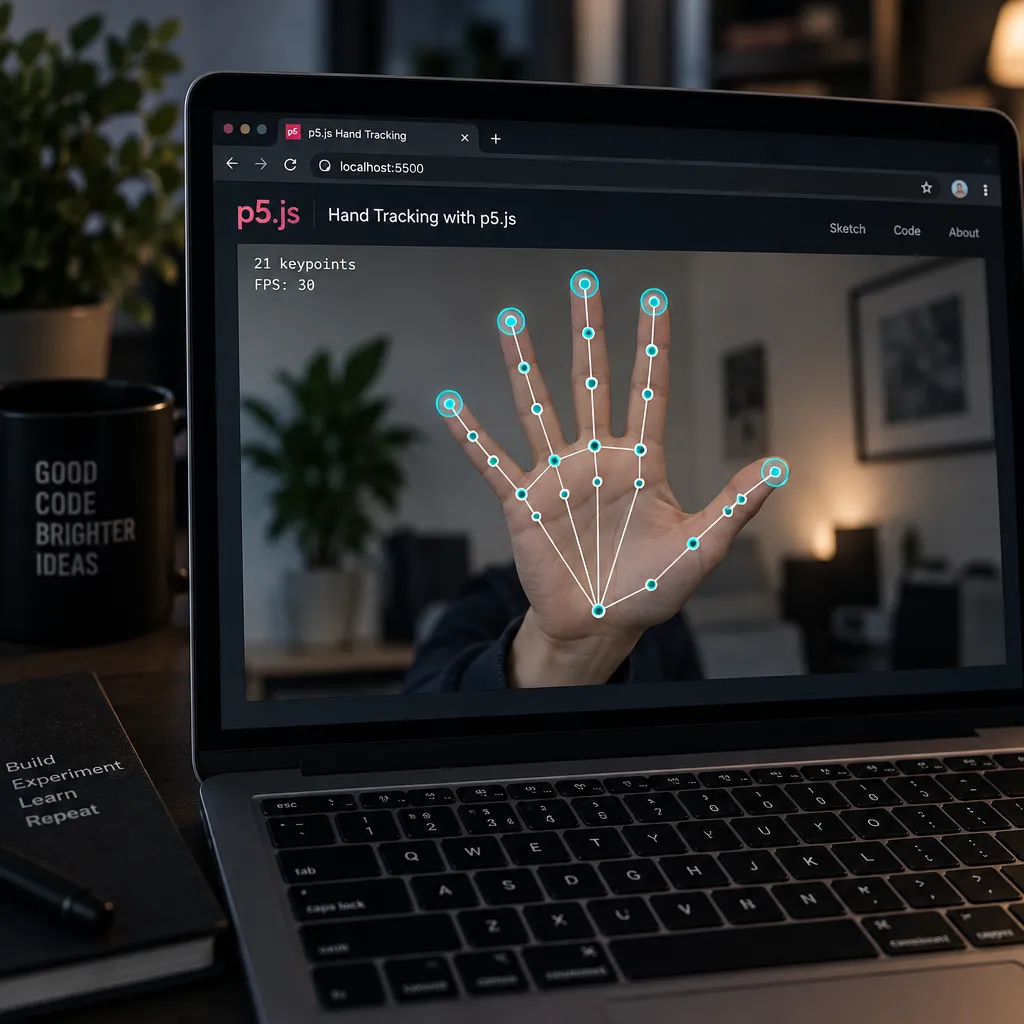
You need three things: load p5.js and ml5.js 1.x, start a mirrored webcam, and call handPose.detectStart(video, gotHands). The callback receives an array of hands, one object per detected hand. You draw from that array in draw().
Quick steps: hand tracking in p5.js
- Add the p5.js and ml5.js script tags to index.html.
- Create the handPose model with flipped set to true.
- Create a flipped webcam capture and hide it.
- Call detectStart with the video and a callback.
- Draw each hand’s 21 keypoints in draw().
Add these to your index.html. The @1 tag resolves to the latest ml5 1.x release (1.3.1 at the time of writing, per the project README):
<script src="https://cdn.jsdelivr.net/npm/p5@1/lib/p5.min.js"></script>
<script src="https://unpkg.com/ml5@1/dist/ml5.min.js"></script>
For p5.js 2.x, change p5@1 to p5@2.
p5.js 1.x version
On p5.js 1.x, create the model in preload(). ml5 hooks into preload so setup() waits until the model is ready.
let handPose;
let video;
let hands = []; // start as an empty array so draw() never sees undefined

// Pairs of keypoint indices that form the hand skeleton
const BONES = [
  [0, 1], [1, 2], [2, 3], [3, 4],
  [0, 5], [5, 6], [6, 7], [7, 8],
  [5, 9], [9, 10], [10, 11], [11, 12],
  [9, 13], [13, 14], [14, 15], [15, 16],
  [13, 17], [0, 17], [17, 18], [18, 19], [19, 20]
];

function preload() {
  handPose = ml5.handPose({ maxHands: 2, flipped: true });
}

function setup() {
  createCanvas(640, 480);
  video = createCapture(VIDEO, { flipped: true });
  video.size(640, 480);
  video.hide();
  handPose.detectStart(video, gotHands);
}

function gotHands(results) {
  hands = results;
}

function draw() {
  image(video, 0, 0, width, height);

  for (let hand of hands) {
    let k = hand.keypoints;

    stroke(0, 255, 180);
    strokeWeight(2);
    for (let [a, b] of BONES) {
      line(k[a].x, k[a].y, k[b].x, k[b].y);
    }

    noStroke();
    fill(hand.handedness === "Right" ? color(255, 80, 120) : color(80, 160, 255));
    for (let p of k) {
      circle(p.x, p.y, 10);
    }
  }
}
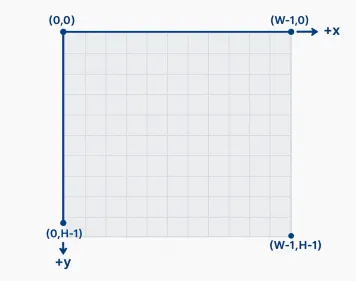
The coordinates are in video pixels with the origin at top left, the same convention covered in our guide to the Processing coordinate system. If you draw the video at a different size than you captured it, scale the points by the same ratio.
p5.js 2.x version (async constructors)
p5.js 2.0 removed preload() in favour of async/await. ml5.js responded with async model constructors. As the ml5.js blog explains, constructors return the model directly under p5 1.x and return a promise that resolves to the model under p5 2.x. Only setup() changes:
let handPose;
let video;
let hands = [];

async function setup() {
  createCanvas(640, 480);
  handPose = await ml5.handPose({ maxHands: 2, flipped: true });
  video = createCapture(VIDEO, { flipped: true });
  video.size(640, 480);
  video.hide();
  handPose.detectStart(video, gotHands);
}

function gotHands(results) {
  hands = results;
}

// draw() is identical to the 1.x version
If you forget await, handPose holds a promise, and handPose.detectStart throws “is not a function”. p5.js 1.x was only scheduled to receive updates into 2026, so new projects should start on 2.x.
Options: maxHands, modelType lite/full, flipped
These options go in the object you pass to ml5.handPose():
| Option | Default | What it does | When to change it |
|---|---|---|---|
maxHands |
2 | Upper limit on hands tracked | Set 1 for a solo installation, more only if you need it |
modelType |
"full" |
Landmark model size | "lite" for older laptops, Raspberry Pi-class hardware, or with heavy visuals |
runtime |
"mediapipe" |
Inference engine | Leave it unless you’re debugging |
flipped |
false |
Mirrors the returned coordinates horizontally | true when your video is mirrored |
Each prediction contains keypoints (21 objects with x, y and name), keypoints3D (the same 21 with x, y, z), handedness, confidence, and named parts such as hand.index_finger_tip, which is keypoint 8. The p5.js “Speak With Your Hands” tutorial uses these named parts throughout.
Flip in one place only
Use createCapture(VIDEO, {flipped: true}) together with ml5.handPose({flipped: true}) so the dots sit on your mirrored hand. Then raise your right hand once to confirm the handedness label reads correctly.
Here’s why both flips are needed:
| Video flipped? | Model flipped? | Result |
|---|---|---|
| Yes | Yes | Mirror view, dots on your fingers. Recommended. |
| Yes | No | Dots appear on the opposite side of the screen from your hand |
| No | Yes | Dots also on the wrong side |
| No | No | Dots line up, but moving right moves the image left, which feels wrong |
The model always sees the raw camera frame. flipped: true on the model mirrors its output coordinates to match the mirrored video you draw. Flip only one side and the two disagree.
Turning keypoints into interaction
Raw keypoints become interaction through a few lines of geometry: distances between points, comparisons between joints, and smoothing over time. The rule that makes it all reliable is to divide every distance by hand size. Otherwise a gesture tuned at arm’s length fails when someone steps closer.
Pinch to draw
A pinch is the thumb tip (4) close to the index tip (8). Measure that distance, then divide it by the wrist (0) to middle-finger MCP (9) distance:
let pinching = false;

function pinchRatio(hand) {
  let t = hand.thumb_tip;
  let i = hand.index_finger_tip;
  let w = hand.wrist;
  let m = hand.middle_finger_mcp;
  let handSize = dist(w.x, w.y, m.x, m.y);
  return dist(t.x, t.y, i.x, i.y) / handSize;
}

function updatePinch(hand) {
  let r = pinchRatio(hand);
  if (!pinching && r < 0.3) pinching = true;   // start below 0.3
  if (pinching && r > 0.45) pinching = false;  // release above 0.45
  return pinching;
}
Here’s a worked example. A hand near the camera might show a 120 px palm (0 to 9) and a 30 px pinch gap, giving a ratio of 0.25. The same hand at the back of the room shows a 40 px palm and a 10 px gap, still 0.25. The raw pixel threshold would have failed in one of those positions. The ratio works in both.
The two thresholds, 0.3 to start and 0.45 to release, are hysteresis. One threshold makes the state flicker when the ratio hovers around it. Two thresholds give a clean on and off. Draw from the midpoint between points 4 and 8 while pinching is true.
Studio tip
Normalise every gesture distance by hand size (wrist 0 to middle-finger MCP 9). A pinch, a spread or a fist then triggers the same way near and far from the camera.
Count extended fingers
A finger counts as extended when its tip is further from the wrist than its PIP joint. A curled finger folds the tip back toward the palm, so the tip ends up closer to the wrist than the PIP. The thumb bends sideways, so compare it against the pinky knuckle (17) instead.
function countFingers(hand) {
  let k = hand.keypoints;
  let d = (a, b) => dist(k[a].x, k[a].y, k[b].x, k[b].y);
  let n = 0;
  for (let f = 1; f <= 4; f++) {
    let tip = 4 * f + 4;
    let pip = 4 * f + 2;
    if (d(tip, 0) > d(pip, 0)) n++;
  }
  if (d(4, 17) > d(3, 17)) n++; // thumb
  return n;
}
This works from the front and at moderate angles. It fails when the hand points straight at the camera, because every finger then looks short. For robust static gestures across many angles, train a classifier. The ml5.js neuralNetwork can learn from the 63 numbers in keypoints3D, and the fingerpose library offers rule-based gesture descriptions built for this keypoint format.
Smoothing and dead zones
Keypoints jitter by a few pixels even when your hand is still. Smoothing with lerp removes the shake at the cost of a little lag:
let smoothTip = null;

function smoothPoint(target, amount = 0.3) {
  if (!smoothTip) smoothTip = createVector(target.x, target.y);
  smoothTip.x = lerp(smoothTip.x, target.x, amount);
  smoothTip.y = lerp(smoothTip.y, target.y, amount);
  return smoothTip;
}
An amount of 0.3 is a good default for drawing. Drop to 0.15 for slow, calm visuals and raise to 0.6 for fast games. A dead zone helps as well: ignore any movement under 2 or 3 px so a resting hand produces a perfectly still output. Smoothing hand data works on the same idea as the gentle drift in a Perlin noise tutorial. Change should be continuous, never jumpy.
To drive sound, map a smoothed value with map() and constrain(), then update one oscillator with a short ramp rather than creating new sounds each frame. Do the same with hand size as a depth proxy: map the 0-to-9 distance to particle size, zoom or reverb, and the hand “pushes” into the scene as it approaches.
Using two hands
With maxHands: 2, the hands array isn’t ordered. The first hand this frame might be the second hand next frame. Give hands a stable identity by sorting on handedness, or by x position when your performers might mix up the labels:
let left = hands.find(h => h.handedness === "Left");
let right = hands.find(h => h.handedness === "Right");
if (left && right) {
  let a = left.index_finger_tip;
  let b = right.index_finger_tip;
  let stretch = dist(a.x, a.y, b.x, b.y);
  // stretch can scale a shape, set a filter cutoff or spread particles
}
Two hands crossing is the hardest case for the model, so design pieces where the hands stay mostly apart. This matters even more in a projection mapping installation, where the performer can’t see a debug overlay.
Handpose in Python: MediaPipe and YOLO26
In Python you have two serious choices. MediaPipe Hand Landmarker gives you real-time hand tracking from a webcam in about 20 lines. Ultralytics YOLO26-pose needs training on the Hand Keypoints dataset before it knows what a hand is.
The MediaPipe loop below uses the Tasks API. Download the hand_landmarker.task model file from Google’s Hand Landmarker page first. In VIDEO mode, MediaPipe’s Python guide requires a timestamp for every frame, and timestamps must increase.
import cv2
import mediapipe as mp
from mediapipe.tasks import python
from mediapipe.tasks.python import vision

options = vision.HandLandmarkerOptions(
    base_options=python.BaseOptions(model_asset_path="hand_landmarker.task"),
    running_mode=vision.RunningMode.VIDEO,
    num_hands=2,
    min_hand_detection_confidence=0.5,
    min_tracking_confidence=0.5,
)

with vision.HandLandmarker.create_from_options(options) as landmarker:
    cap = cv2.VideoCapture(0)
    timestamp_ms = 0
    while cap.isOpened():
        ok, frame = cap.read()
        if not ok:
            break
        rgb = cv2.cvtColor(frame, cv2.COLOR_BGR2RGB)
        image = mp.Image(image_format=mp.ImageFormat.SRGB, data=rgb)
        timestamp_ms += 33
        result = landmarker.detect_for_video(image, timestamp_ms)
        for hand, label in zip(result.hand_landmarks, result.handedness):
            tip = hand[8]  # index fingertip, normalised 0..1
            print(label[0].category_name, round(tip.x, 3), round(tip.y, 3), round(tip.z, 3))
    cap.release()
Python landmarks are normalised from 0 to 1, not in pixels. Multiply x by the frame width and y by the height before drawing. Send the values over OSC and you can drive TouchDesigner, Max or an openFrameworks app from the same loop.
Training on the Ultralytics Hand Keypoints dataset
Training YOLO26-pose on hands takes one call. The dataset downloads automatically on first use.
from ultralytics import YOLO model = YOLO("yolo26n-pose.pt")  # pretrained on COCO's 17 body keypoints
results = model.train(data="hand-keypoints.yaml", epochs=100, imgsz=640)
The same thing from the command line:
yolo pose train data=hand-keypoints.yaml model=yolo26n-pose.pt epochs=100 imgsz=640
The pretrained weights give you a head start on learning keypoint structure. The 17-point body head is replaced by a 21-point hand head defined in hand-keypoints.yaml. After training, load runs/pose/train/weights/best.pt and run model.predict(source=0, show=True) for a webcam test. Each result’s keypoints.xy holds 21 (x, y) points per detected hand.
The same YAML trained on YOLO11 and YOLOv8 pose models in earlier Ultralytics releases. Only the weight file name changes. Use a GPU. One hundred epochs over roughly 18,000 images is a long job on a laptop CPU.
Using a community fine-tune
There’s no official pretrained YOLO hand model. The Ultralytics docs point to a community YOLO26s-pose hand-keypoints fine-tune shared on GitHub under the name vbalab/YOLO26s-pose-hands. Treat it as a community resource with an unverified track record. Check its accuracy on your own footage before building on it, and remember that weights trained on a non-commercial dataset carry that restriction too.
Hand pose datasets
The dataset most handpose searchers find is the Ultralytics Hand Keypoints dataset. It’s ready-made for YOLO training and is about 369 MB. Its labels are machine-generated and its licence is non-commercial, and both facts shape what you can do with it.
| Property | Value |
|---|---|
| Total images | 26,768 |
| Training split | 18,776 |
| Validation split | 7,992 |
| Classes | 1 (hand) |
| Keypoints per hand | 21, stored as (x, y, visibility) |
| Label source | Generated with Google MediaPipe |
| Image sources | 11k Hands, Kaggle “2000 Hand Gestures”, Kaggle “Gesture Recognition” |
| Download size | About 369 MB |
| Licence | Creative Commons BY-NC-SA 4.0 |
| Creator | Rion Dsilva |
| Config file | hand-keypoints.yaml |
Figures are from the current Ultralytics documentation. Some mirrors of older docs list a slightly different validation count.
The images come mostly from controlled, close-up hand photos, so the dataset suits single hands well. It’s weaker for wide shots, crowds and hands gripping objects.
For research-grade evaluation, papers on 3D hand pose often report results on benchmarks such as EgoDexter (egocentric video with hands interacting with objects) and Dexter+Object (third-person hand-object scenes). Those test the hard cases a webcam toy rarely meets. CMU’s OpenPose project, which predates MediaPipe Hands, also published a 21-point hand keypoint detector. That’s one reason the 21-point convention became standard.
Licensing for commercial and installation work
CC BY-NC-SA 4.0 means you must give attribution, can’t use it commercially, and must share derivatives under the same licence. A model trained on this dataset for a paid brand activation, a commissioned museum installation or a product falls under “commercial” in any cautious reading.
Heads up
For commercial or commissioned work, use MediaPipe Hand Landmarker (Apache 2.0) or ml5.js instead of a YOLO model trained on the Ultralytics hand dataset. Ultralytics’ own code is AGPL-3.0 unless you buy an Enterprise licence.
For most installations the simple answer is to skip training. MediaPipe’s model is free under Apache 2.0, already accurate, and is the source the dataset’s labels came from in the first place.
From 2D to 3D hand poses
Most interactive work needs less 3D than people expect. MediaPipe world landmarks and ml5’s keypoints3D already give you a hand-centred 3D skeleton that ignores where the hand sits in the frame. That’s enough for rotation-invariant gestures, rigging a 3D hand in three.js, or measuring finger angles.
Here’s how far each level of 3D gets you:
- Relative depth (z in image landmarks): which finger is in front. Use it to tell a palm-forward hand from a back-of-hand pose.
- Hand-centred 3D (world landmarks,
keypoints3D): joint angles and gesture features. Feed these to a classifier rather than pixel coordinates. - Absolute 3D in camera space: where the hand is in the room. A single webcam can’t measure this directly. Approximate it with hand size, or add a depth camera.
- Full mesh (MANO): surface shape for occlusion in AR, realistic animation or grasp research.
Research pipelines that need the mesh usually chain the steps. They detect 2D keypoints first, often with MediaPipe, then fit MANO’s shape and pose parameters to match. Recent academic work on monocular 3D hand pose has gone further and estimates camera parameters implicitly, so the fit works across unknown webcams, then evaluates on EgoDexter and Dexter+Object. Those methods are worth knowing about for research, but they’re too heavy for a p5.js sketch, and MediaPipe’s built-in 3D landmarks cover most creative uses.
The anti-alias and depth testing settings in three.js matter more than model accuracy once you render a 3D hand. Jagged, z-fighting fingers look worse than a slightly misplaced knuckle.
Troubleshooting handpose
Most handpose bugs come from one of three causes: code written for a different ml5 version, a model used before it finished loading, or mirroring applied in only one place. Find your symptom in the table, then apply the fix.
| Symptom | Likely cause | Fix |
|---|---|---|
hands is undefined in draw() |
Variable declared without a value, and draw() runs before the first callback |
Declare let hands = []; at the top and loop over it safely |
ml5.handpose is not a function |
0.x code running on the ml5 1.x library | Rename to ml5.handPose and switch to detectStart, or pin the old 0.x release |
handpose.on('pose') never fires |
Event API from 0.x. Handpose used 'predict', PoseNet used 'pose', and 1.x has no events |
In 1.x call handPose.detectStart(video, gotHands) |
| Model loads but no hands are detected | Camera permission denied, video not passed, or a hand too far away or in poor light | Check that the video is visible, allow the camera, and move the hand within about 1 to 2 m in even light |
detectStart is not a function on p5 2.x |
Constructor returned a promise that wasn’t awaited | Use async function setup() and await ml5.handPose() |
| Dots sit on the wrong side | Video mirrored but model not (or the reverse) | Set flipped: true on both createCapture and ml5.handPose |
| Left and right labels swapped | Mirroring changes what the model reads as handedness | Test with your right hand and swap labels in code once |
| Lag when combining ml5 and p5.sound | Model inference and audio processing compete on the same thread | Use modelType: "lite", maxHands: 1, a 640×480 video, and one reused oscillator with ramped changes |
| NaN keypoints from hand-pose-detection | Reported with the tfjs-webgl runtime |
Switch to runtime: "mediapipe" |
| TypeError creating the MediaPipeHands detector | mediapipe runtime without its solution files, or mismatched package versions |
Set solutionPath to the matching @mediapipe/hands files and align package versions |
| Points jitter on a still hand | Normal model noise | Smooth with lerp, add a 2 to 3 px dead zone |
A fast way to tell which ml5 version a tutorial was written for: 0.x code uses ml5.handpose(video, modelReady), .on('predict', ...) and prediction.landmarks. 1.x code uses ml5.handPose(), detectStart and hand.keypoints. Copying snippets from mixed sources, an easy habit with vibe coding, is the single most common cause of these errors.
Performance for live shows follows a clear order of impact. Cut maxHands to what you need first, since each extra hand costs frame rate. Then switch to the lite model. Then lower the capture resolution. Finally, raise detection confidence if false hands appear in a busy room.
Set maxHands to what you need
A solo installation needs maxHands: 1. Every extra hand slot costs frame rate and adds chances for a stray detection from a passer-by.
FAQ
What is handpose?
Handpose is hand pose estimation: finding the 21 joint positions of a hand in a camera image. The term also names TensorFlow.js’s original HandPose model and ml5.js’s hand tracker, now spelled handPose in ml5.js 1.x.
How many keypoints does a hand pose model detect?
The standard is 21 per hand: the wrist plus four points on each of the five fingers. MediaPipe, ml5.js, TF.js and YOLO models trained on the Ultralytics Hand Keypoints dataset all use this layout, with fingertips at 4, 8, 12, 16 and 20.
What is the difference between ml5.handpose and ml5.handPose?
ml5.handpose is the ml5.js 0.x function, built on the older TF.js model with an event-based API. ml5.handPose is the ml5.js 1.x version, with detectStart, two-hand support by default, named keypoints and keypoints3D. Code for one doesn’t run on the other without changes.
Can handpose detect two hands?
Yes. ml5.js handPose tracks up to 2 hands by default, and MediaPipe Hand Landmarker supports more if you raise num_hands from its default of 1. Only the original TF.js HandPose model was limited to one hand.
Is handpose 3D?
Partly. Image keypoints are 2D, with z as relative depth from the wrist. ml5’s keypoints3D and MediaPipe’s world landmarks give a hand-centred 3D skeleton, but not the hand’s distance from the camera in real units.
Can YOLO do hand pose estimation?
Yes, after training. YOLO26-pose ships with COCO’s 17 body keypoints and no hand model, so you fine-tune it on a 21-keypoint hand dataset such as Ultralytics Hand Keypoints. Because those labels came from MediaPipe, expect accuracy close to MediaPipe’s, not better.
How do I train YOLO26 on the hand keypoints dataset?
Load yolo26n-pose.pt with the Ultralytics package and call model.train(data="hand-keypoints.yaml", epochs=100, imgsz=640). The roughly 369 MB dataset downloads automatically. Use a GPU, and check the non-commercial licence before you deploy the result.
Which hand pose dataset should I use?
For training a YOLO model on single, clearly visible hands in non-commercial work, use Ultralytics Hand Keypoints. For evaluating 3D methods on hands holding objects, research uses benchmarks such as EgoDexter and Dexter+Object. For commercial interaction work, skip training and use MediaPipe’s pretrained model.
Does ml5.js work with p5.js 2.0?
Yes. ml5.js 1.x added async model constructors, so under p5.js 2.x ml5.handPose() returns a promise. Await it inside async function setup(), because p5.js 2.x no longer has preload().
Why are my handpose keypoints mirrored?
Your video and your model disagree about mirroring. Pass { flipped: true } to both createCapture(VIDEO, ...) and ml5.handPose(...) so the points match the mirrored image, then check the left and right labels with one raised hand.
Try it live
This sketch runs the gesture math from this guide on a simulated hand that uses the exact 21-keypoint order of ml5.js handPose, so it works without a camera or model download. Move the mouse to move the hand and hold the button to pinch and draw. The hand grows and shrinks on its own. Watch the raw pinch distance change while the normalised ratio stays steady. To use your real hand, replace the output of buildHand() with hands[0].keypoints from the quick-start sketch.
// Simulated hand using the same 21 keypoint order as ml5.js handPose.
// Move the mouse to move the hand. Hold the mouse button to pinch and draw.
// The hand grows and shrinks by itself: the raw pinch distance changes,
// but the normalized ratio (divided by hand size) stays steady.

// Base angle and length from the wrist, pointing angle and segment lengths
const fingers = [
  { base: -0.9, len: 45, dir: -1.0, segs: [38, 30, 26] },   // thumb 1-4
  { base: -0.25, len: 95, dir: -0.15, segs: [42, 28, 22] }, // index 5-8
  { base: 0.0, len: 98, dir: 0.0, segs: [46, 30, 24] },     // middle 9-12
  { base: 0.25, len: 92, dir: 0.15, segs: [42, 28, 22] },   // ring 13-16
  { base: 0.5, len: 84, dir: 0.35, segs: [34, 22, 20] }     // pinky 17-20
];
const bones = [[0,1],[1,2],[2,3],[3,4],[0,5],[5,6],[6,7],[7,8],[5,9],[9,10],
  [10,11],[11,12],[9,13],[13,14],[14,15],[15,16],[13,17],[0,17],[17,18],
  [18,19],[19,20]];

let smooth = [];      // smoothed keypoints
let trail = [];       // midpoints recorded while pinching
let pinchAmt = 0;     // 0 = open hand, 1 = fingertips touching
let pinching = false; // pinch state with two thresholds (hysteresis)

function setup() {
  createCanvas(800, 600);
  textFont('monospace');
}

function draw() {
  background(18, 20, 28);
  let t = millis() / 1000;

  // 1. Build a fake prediction, shaped like handPose keypoints
  let s = 0.8 + 0.3 * sin(t * 0.6);
  let tx = mouseX > 0 && mouseX < width ? mouseX : width / 2;
  let ty = mouseY > 0 && mouseY < height ? mouseY : height / 2;
  pinchAmt = lerp(pinchAmt, mouseIsPressed ? 1 : 0, 0.15);
  let curls = [0.2, 0.15 + 0.3 * pinchAmt];
  for (let f = 2; f < 5; f++) {
    curls.push(constrain(map(noise(t * 0.4, f), 0.35, 0.65, 0, 1), 0, 1));
  }
  let pts = buildHand(tx, ty + 100 * s, s, curls, pinchAmt);

  // 2. Smooth every keypoint with lerp to remove jitter
  for (let i = 0; i < 21; i++) {
    if (!smooth[i]) smooth[i] = pts[i].copy();
    smooth[i] = p5.Vector.lerp(smooth[i], pts[i], 0.3);
  }
  let k = smooth;

  // 3. Pinch: thumb tip (4) to index tip (8), divided by hand size (0 to 9)
  let handSize = p5.Vector.dist(k[0], k[9]);
  let raw = p5.Vector.dist(k[4], k[8]);
  let ratio = raw / handSize;
  if (!pinching && ratio < 0.3) pinching = true;
  if (pinching && ratio > 0.45) pinching = false;
  if (pinching) trail.push(p5.Vector.lerp(k[4], k[8], 0.5));
  if (trail.length > 400) trail.shift();

  // 4. Count extended fingers: tip farther from the wrist than its PIP joint
  let count = 0;
  for (let f = 1; f < 5; f++) {
    if (p5.Vector.dist(k[f * 4 + 4], k[0]) > p5.Vector.dist(k[f * 4 + 2], k[0])) count++;
  }
  // Thumb: tip farther from the pinky knuckle (17) than the thumb IP joint (3)
  if (p5.Vector.dist(k[4], k[17]) > p5.Vector.dist(k[3], k[17])) count++;

  // 5. Draw the trail, then the skeleton, then the points
  for (let i = 1; i < trail.length; i++) {
    stroke(255, 120, 200, map(i, 0, trail.length, 20, 255));
    strokeWeight(4);
    line(trail[i - 1].x, trail[i - 1].y, trail[i].x, trail[i].y);
  }
  stroke(120, 200, 255);
  strokeWeight(2);
  for (let b of bones) line(k[b[0]].x, k[b[0]].y, k[b[1]].x, k[b[1]].y);
  noStroke();
  for (let i = 0; i < 21; i++) {
    let tip = i % 4 === 0 && i > 0; // fingertips are 4, 8, 12, 16, 20
    fill(tip ? color(255, 220, 90) : 240);
    circle(k[i].x, k[i].y, tip ? 12 : 7);
  }

  // 6. Readout of the numbers that drive the interaction
  fill(230);
  text('raw pinch distance: ' + nf(raw, 1, 1) + ' px', 20, 30);
  text('hand size (0 to 9): ' + nf(handSize, 1, 1) + ' px', 20, 50);
  text('normalized ratio:   ' + nf(ratio, 1, 2) + (pinching ? '  PINCH' : ''), 20, 70);
  text('extended fingers:   ' + count, 20, 90);
  text('hold the mouse to pinch and draw, press C to clear', 20, height - 20);
}

// Build 21 keypoints: the wrist, then 4 points per finger from base to tip
function buildHand(cx, cy, s, curls, p) {
  let out = [createVector(cx, cy)];
  for (let f = 0; f < 5; f++) {
    let F = fingers[f];
    let a = -HALF_PI + F.base;
    let pos = createVector(cx + cos(a) * F.len * s, cy + sin(a) * F.len * s);
    out.push(pos.copy());
    let d = -HALF_PI + F.dir;
    let bend = 0;
    for (let j = 0; j < 3; j++) {
      bend += curls[f] * 1.1;            // curling shortens each segment
      let l = F.segs[j] * s * cos(bend); // as seen from the front
      pos = createVector(pos.x + cos(d) * l, pos.y + sin(d) * l);
      out.push(pos);
    }
  }
  // Pull the thumb tip and index tip toward each other to fake a pinch
  let mid = p5.Vector.lerp(out[4], out[8], 0.5);
  out[4] = p5.Vector.lerp(out[4], mid, p);
  out[8] = p5.Vector.lerp(out[8], mid, p);
  out[3] = p5.Vector.lerp(out[3], mid, p * 0.4);
  out[7] = p5.Vector.lerp(out[7], mid, p * 0.4);
  return out;
}

function keyPressed() {
  if (key === 'c' || key === 'C') trail = [];
}
Once the pinch feels right here, connect it to the camera and change one thing at a time: the thresholds, then the smoothing amount, then what the gesture controls. Keep the hand-size normalisation and the hysteresis however you remix it.
On this article
- Facts were checked against the sources below before publication.
- Published
Sources (8)
- Hand Keypoints Dataset - Ultralytics YOLO Docs (docs.ultralytics.com)
- Pose Estimation - Ultralytics YOLO Docs (docs.ultralytics.com)
- Hand landmarks detection guide - Google AI Edge MediaPipe (developers.google.com)
- Hand landmarks detection guide for Python - MediaPipe (developers.google.com)
- HandLandmarkerOptions - MediaPipe Python API (ai.google.dev)
- ml5-next-gen documentation (github.com)
- Using ml5.js with p5.js 2.0: Now with Async Model Constructors (ml5js.org)
- ml5 1.3.1 README (cdn.jsdelivr.net)