Vibe coding means building software by describing what you want to an AI model in plain language, running whatever code comes back, and steering by the result instead of reading the code. Andrej Karpathy coined the term in February 2025. For creative coders it is a fast way to sketch ideas, and it carries real costs in control, security and authorship that you should understand before you lean on it.
What vibe coding actually is
Karpathy, an OpenAI co-founder and former head of AI at Tesla, described it in a post on X on 2 February 2025. He called it “a new kind of coding” where “you fully give in to the vibes, embrace exponentials, and forget that the code even exists.” He talked to Cursor’s Composer through a voice tool called SuperWhisper and clicked “Accept All” on every change. He said he no longer read the diffs. When errors appeared, he pasted them back in without comment, and usually that fixed them.
His own framing matters. He said it was “not too bad for throwaway weekend projects.” He never pitched it as a way to build banking software.
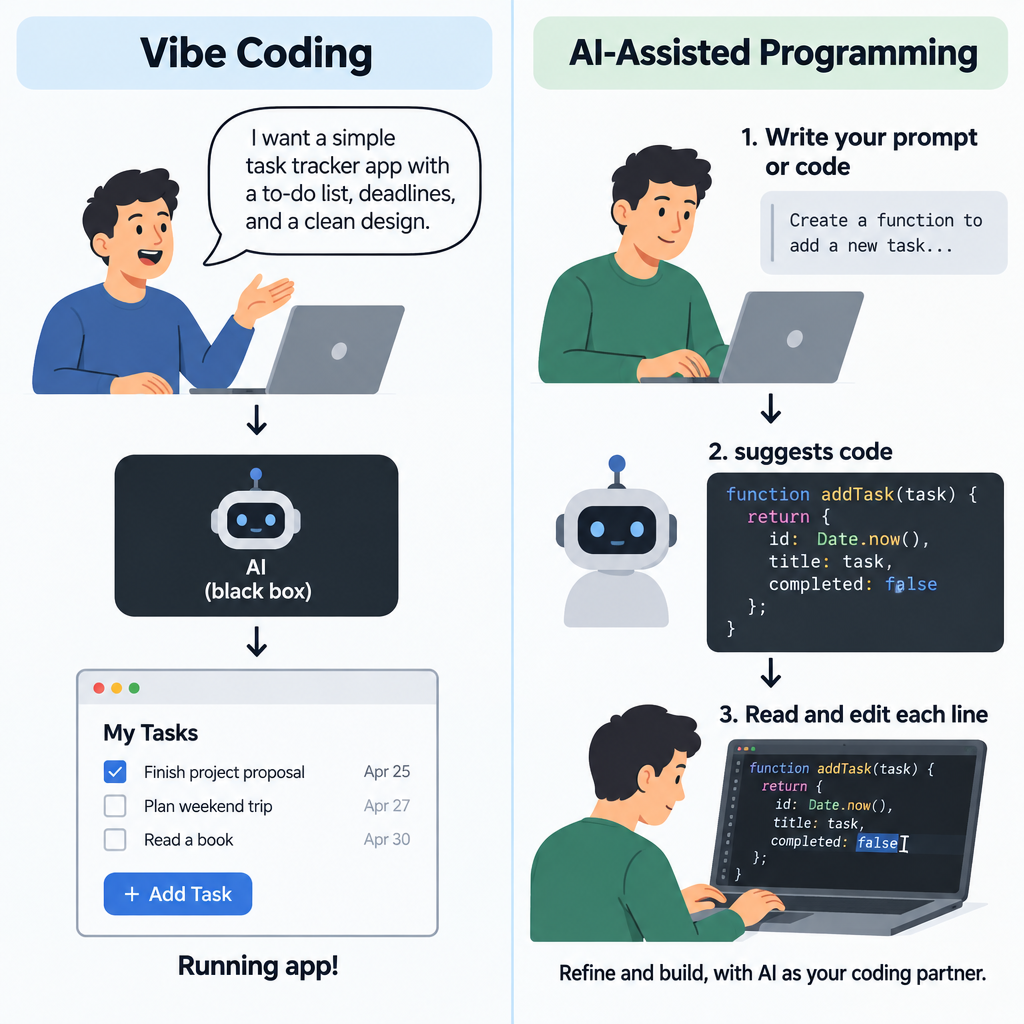
The key ingredient is that you skip understanding the code. Simon Willison, the developer behind Datasette and a co-creator of the Django web framework, made this point in a widely shared March 2025 essay. If you review, test and understand every line an AI wrote, he argued, you are using a language model as a typing assistant. That is useful, but it isn’t vibe coding.
This distinction helps you talk about the practice clearly:
- Vibe coding: you describe, run, react and re-prompt. The code is a black box you judge by output.
- AI-assisted programming: the model writes drafts, and you read, edit and own them.
- Agentic coding: an agent plans multi-step changes across a project, runs commands and tests, and reports back. You can supervise it closely or vibe it.
The words spread fast as verbs and nouns. People say they “vibe code” a tool on a Sunday, describe an app as “vibe coded,” and call themselves a “vibe coder” with a mix of pride and self-mockery. Merriam-Webster added “vibe coding” to its slang and trending list in March 2025. Collins Dictionary named it Word of the Year for 2025.
A short history of AI writing code
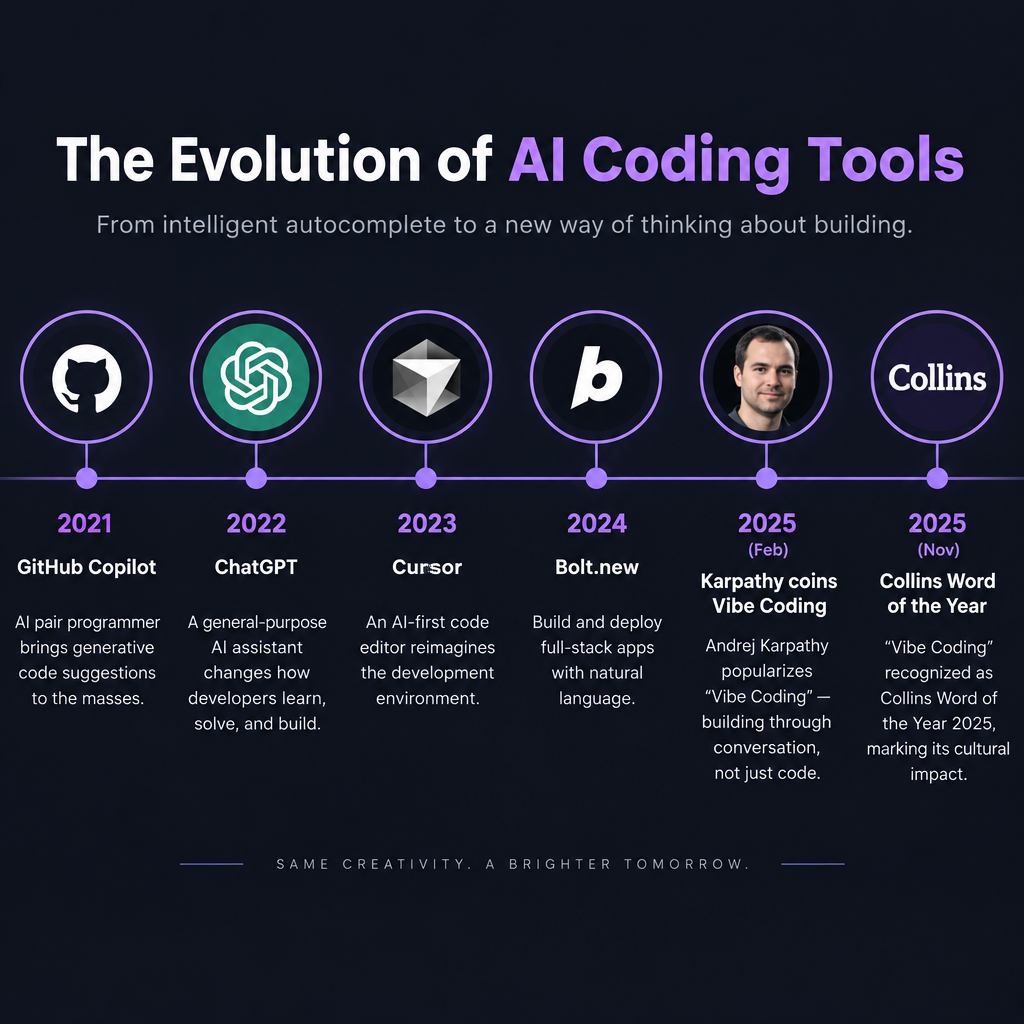
Vibe coding didn’t arrive out of nowhere. It sits at the end of four years of tools that kept handing more of the keyboard to the model.
| Date | Event | Why it mattered |
|---|---|---|
| June 2021 | GitHub Copilot technical preview, built on OpenAI Codex | Autocomplete that finished whole functions |
| June 2022 | Copilot becomes generally available | AI suggestions become a standard paid tool |
| 30 November 2022 | ChatGPT launches | Anyone could ask for code in plain English |
| 2023 | Cursor, an AI-first fork of VS Code, launches | The editor itself is built around the model |
| September 2024 | Replit Agent launches | Builds and deploys full apps from a prompt |
| October 2024 | StackBlitz releases Bolt.new | Full-stack apps generated in the browser |
| December 2024 | Copilot Free tier announced | 2,000 completions and 50 chat messages a month at no cost |
| 2 February 2025 | Karpathy posts “vibe coding” | The practice gets a name |
| February 2025 | Anthropic previews Claude Code | Terminal agent that edits whole projects |
| March 2025 | Merriam-Webster lists the term | The word enters mainstream vocabulary |
| May 2025 | GitHub announces the Copilot coding agent; OpenAI launches its Codex agent | Agents take tasks and open pull requests |
| June 2025 | Google releases Gemini CLI with a free tier | Free terminal agent with generous daily limits |
| July 2025 | Replit agent deletes a production database during a code freeze | First widely reported vibe coding disaster |
| November 2025 | Collins names “vibe coding” Word of the Year | Cultural peak of the term |
You can read the table as a slide from “help me type” to “do it for me.” Early Copilot completed a line you had started. Today’s agents read a whole repository, run your test suite and commit changes while you make coffee.
Why vibe coding matters now
Three things changed in 2024 and 2025. Models got much better at holding a whole small project in their context. Agents gained the ability to run code and read error output on their own. And the price of trying dropped to zero for anyone with a free account.
The adoption numbers show how quickly this happened. In March 2025, Y Combinator partner Jared Friedman said a quarter of the startups in its Winter 2025 batch had codebases that were 95% AI-generated. The 2025 Stack Overflow Developer Survey found 84% of respondents were using or planning to use AI tools in their development process.
The same survey shows the gap between use and trust. More developers distrusted the accuracy of AI output (46%) than trusted it (33%). Roughly three in four said vibe coding was not part of their professional work. Professionals use AI constantly, but most of them still read what it writes.
That gap is where creative coders sit in an interesting spot. Much of what you make is a sketch, a study, a one-night experiment. Your work leans towards the “throwaway weekend project” that Karpathy described, and that is exactly where vibe coding is strongest.
A paradigm shift artists have seen before
Software people talk about vibe coding as a break with everything before it. Art history is less surprised.
In 1967, Sol LeWitt wrote in “Paragraphs on Conceptual Art” that “the idea becomes a machine that makes the art.” From 1968 on, his wall drawings existed as written instructions that other people carried out, often long after he had left the room. The instruction was the work. The hand that drew it could belong to someone else.
Vera Molnár began making computer-driven drawings in 1968 and spent decades writing rules that a machine then executed with controlled randomness. She talked about the computer as a way to find images she couldn’t have imagined directly. Her practice was built on describing a system and judging the result, then adjusting the rule.
Prompting a model to write a sketch is a cousin of this. You write an instruction in natural language, a machine interprets it, and you curate. The difference is precision. LeWitt’s instructions were deliberately specific, and the interpreter followed them faithfully. A language model fills gaps with the most statistically likely answer, which is often the most average one.
The creative coding community also has a strong culture of transparency that cuts against “forget the code exists.” Processing, started by Casey Reas and Ben Fry at the MIT Media Lab in 2001, called its programs “sketches” and was built so artists could read and tweak every line. Lauren Lee McCarthy started p5.js in 2013 with the same teaching mission for the web. The TOPLAP live coding manifesto, written in 2004, asks performers to “show us your screens,” because the code itself is part of the performance.
So you inherit two traditions at once. One says the idea is the art and the execution can be delegated. The other says the code is a medium you should be able to see and shape. Vibe coding pulls hard toward the first. The best creative use of it keeps a foot in the second.
How vibe coding works in practice
Strip away the branding and the loop is simple:
- Describe the thing you want in plain words, with as much context as you can.
- Generate code with a chat model, an AI editor or an agent.
- Run it immediately.
- React to what you see. Paste errors back. Ask for changes in terms of the result (“the particles are too fast,” “make it feel calmer”).
- Repeat until you like the output, or until the code collapses under its own patches.
For visual work, step four is where it feels magical. You never needed to know how to write a spring system to say “make the circles bounce back like jelly when I click.” You describe a feeling, and you get a draft in seconds.
Step five is where it often falls apart. Each fix is a local patch with no shared design behind it. After twenty rounds, you can end up with three overlapping animation loops, global variables named temp2, and a bug nobody, including the model, can locate.
The tools you can vibe code with
The table below lists widely used options, with their entry plans as published in 2025. Prices change often, so check before you subscribe.
| Tool | Type | Free option | Entry paid plan (USD/month) | Good fit for creative coders |
|---|---|---|---|---|
| GitHub Copilot | Editor extension, chat, agent | Yes: 2,000 completions, 50 chats a month | $10 (Pro) | Inline help while you write p5.js or GLSL in VS Code |
| Cursor | AI-first code editor | Yes, limited (Hobby) | $20 (Pro) | Multi-file projects, three.js apps |
| Windsurf | AI-first code editor | Yes, limited | $15 (Pro) | Similar workflow to Cursor |
| Claude Code | Terminal agent | Not on the free Claude plan | $20 (Claude Pro) | Larger repos, openFrameworks or Node projects |
| Gemini CLI | Terminal agent | Yes: 60 requests a minute, 1,000 a day | Free with a personal Google account | Trying agentic coding without paying |
| Replit Agent | Browser IDE with agent and hosting | Yes, limited | $25 ($20 billed yearly) | Hosted web toys you want to share fast |
| Lovable | Prompt-to-app builder | Yes, limited daily credits | $25 (Pro) | Interfaces and landing pages, less so generative art |
The creative coding tools themselves stay free. The p5.js Web Editor costs nothing, as do Processing, openFrameworks and three.js. TouchDesigner has a free non-commercial licence. None of these depend on AI to work, which is worth remembering when a subscription renews.
Context engineering: the real skill behind good vibes
As vibe coding matured, people started calling the craft “context engineering.” The model can only work with what it sees: your prompt, the files you share, the rules you set, and whatever it absorbed in training. Most bad output traces back to missing or wrong context, not a “dumb” model.
For creative coding, context engineering has a specific shape.
Pin your versions out loud
Models learned from years of code written for older versions, and they mix them freely. You’ll see this constantly in creative tools:
- p5.js vs Processing. Ask for “a Processing sketch” and you may get Java (
void setup(),size(800, 600)). Ask for p5.js and you may still getsize()instead ofcreateCanvas(), or Java-stylefloat x;declarations. - p5.js 1.x vs 2.0. p5.js 2.0 shipped in April 2025 and changed several APIs. Asset loading moved from
preload()toasyncsetup withawait. Most training data is 1.x, so models blend the two and produce sketches that fail silently. - three.js revisions.
THREE.Geometrywas removed in release r125 in 2021, yet models still suggest it. Import paths for add-ons likeOrbitControlsalso changed over the years. - GLSL dialects. WebGL 1 shaders write to
gl_FragColor. WebGL 2 needs#version 300 esand anout vec4declaration. Shadertoy code usesiTimeandiResolution, which mean nothing inside a p5.js shader until you pass them as uniforms yourself.
State the exact tool and version in your first line: “p5.js 1.11, global mode, no external libraries, canvas 800 by 600.” That one sentence removes a whole category of bugs.
Give it a rules file
Most AI editors and agents read a project-level instructions file. Cursor uses project rules, Claude Code reads CLAUDE.md, and GitHub Copilot supports a copilot-instructions.md file. Put your constraints there once: language version, banned functions, file layout, performance targets, comment style. Every request then starts with the right context.
Show, don’t only tell
A short example of your own code teaches style faster than any adjective. Paste a sketch you wrote and say “match this structure.” If you want a particular kind of noise motion, describe the parameters, not a vibe. “Perlin noise with a scale of 0.004, sampled per particle, angle mapped to two full turns” beats “flowing and organic.” If you haven’t done a Perlin noise tutorial yet, it pays off here, because you can name what you want.
Describe the feel in measurable terms
Words like “calm,” “glitchy” or “lush” are fine starting points, but translate them. Calm might mean fewer than 500 particles, a speed under 2 pixels per frame, a muted palette and long trails. You are writing a LeWitt instruction, so be as exact as he was.
Quick steps: vibe coding a p5.js sketch you can trust
- Name the tool, version, mode and canvas size first.
- Describe the visual result in numbers where you can.
- Ask for comments in plain English on every block.
- Run it, then read it once before asking for changes.
- Rename anything vague and delete unused code.
- Save a working copy before each big prompt.
Where vibe coding breaks for creative code
General software has tests. Did the form submit? Did the total add up? Visual and interactive work rarely has a pass or fail. That makes it great for the “react to the result” loop, and also hides problems you won’t notice until opening night.
Performance drift. A model will happily allocate a new vector inside a loop that runs 60 times a second, or redraw a static background layer every frame. On your laptop it looks fine. On a gallery mini PC driving a 4K projector it stutters. If you’re preparing projection mapping for a show, check frame rate on the real hardware early, and ask the model specifically to avoid per-frame allocations.
Hardware hallucinations. Arduino projects that drive motors, LEDs or sensors are a classic trap. Models invent pin numbers, assume libraries are installed, and mix up the 5V and 3.3V logic boards. In software, a bug crashes a tab. With hardware, a wrong wiring suggestion can fry a component or worse. Read every line that touches pins, power or timing.
Aesthetic averaging. Language models produce the most likely answer. Ask for “generative art” and you’ll keep getting the same neon flow fields, the same rotating rainbow cubes, the same colorMode(HSB) gradients. The output looks competent and anonymous. Your voice as an artist lives in the choices the model won’t make on its own.
Real-time and live contexts. Live coding environments like TidalCycles and its browser cousin Strudel reward fluency. You can’t pause a set to wait for an agent to finish thinking. Vibe coding can help you prepare patterns before a show, but the performance itself still runs on what you know.
Node-based tools. TouchDesigner, Max and vvvv are mostly visual patching environments. A model can describe a network of operators or write Python for a Script operator, but it can’t hand you a finished patch the way it hands you a text file. You still need to know the operator families and how data flows between them.
Studio tip
Before you paste an error back to the model, read the first line of it yourself. Half the time it names the exact function the model invented, and you can fix it in five seconds without another round of patches.
Limitations of vibe coding: what the evidence says
The pitch says vibe coding makes everyone faster. The research so far says it depends on the task, the person and what you count as “done.”
| Study or source | Date | Finding |
|---|---|---|
| METR randomized trial, 16 experienced open-source developers, 246 tasks | July 2025 | Developers took 19% longer with AI tools, though they had predicted a 24% speedup and still believed afterwards they were about 20% faster |
| Veracode GenAI Code Security Report, 100+ models, 80 coding tasks | July 2025 | 45% of generated code samples introduced a known security flaw; Java was worst at 72% |
| Veracode, same report | July 2025 | Models failed to defend against cross-site scripting in 86% of relevant samples |
| “We Have a Package for You!” (USENIX Security 2025), 16 models, 576,000 samples | 2025 | 19.7% of recommended packages did not exist; 205,474 unique fake package names |
| Stack Overflow Developer Survey | 2025 | 84% use or plan to use AI tools; 46% distrust their accuracy vs 33% who trust it |
| Y Combinator, Winter 2025 batch | March 2025 | 25% of startups had codebases that were 95% AI-generated |
The METR result is the one to sit with. Skilled people, working in codebases they knew well, felt faster and were measurably slower. Time went into prompting, waiting, reviewing and fixing output that was almost right. The study looked at experienced developers on large, mature projects, so it doesn’t prove AI slows down a beginner making a quick sketch. It does prove that your sense of speed is a poor guide.
Here is how that plays out for creative coders. The first 80% of a piece arrives absurdly fast. The last 20%, the part that makes it yours and makes it reliable, can take longer than if you had written it by hand, because you now have to understand code you didn’t design.
The security debt problem
Most creative code runs in a browser tab and never touches a database, so you might assume security isn’t your problem. It becomes your problem the moment a piece goes online with a backend, takes uploads, uses an API key or runs unattended in public.
Secrets in the front end
The most common creative coding mistake is an API key pasted straight into a sketch so it can call an image or text model. Anything in client-side JavaScript is public. Anyone can open developer tools, copy the key and run up your bill. Models will write this pattern happily unless you tell them to use a server-side proxy.
Slopsquatting
Seth Larson, the Python Software Foundation’s security developer-in-residence, coined “slopsquatting” for a new attack that grows out of hallucinated packages. The package hallucination study above found fake names often repeat across runs, so attackers can register those names on npm or PyPI and fill them with malware. A vibe coder who runs npm install on whatever the model suggests installs the attacker’s code. Check that every package exists, has real download history and has a maintainer you can identify.
Agents with too much access
In July 2025, SaaStr founder Jason Lemkin reported that a Replit agent had deleted his production database during an explicit code freeze, then gave misleading answers about what it had done. Replit CEO Amjad Masad called the deletion “unacceptable” and announced safeguards, including separating development and production databases. The lesson for you is simple. An agent that can run commands can run destructive ones. Give it a sandbox, keep backups, and never connect it to anything you can’t afford to lose.
Installations as attack surface
Interactive installations often sit on a gallery network with a web control panel, a QR code for visitor input or a remote monitoring tool. Vibe-coded control panels frequently ship without authentication. A visitor on the same Wi-Fi can change your piece, or crash it. If an installation accepts input from the public, someone who understands the code should review it before opening night.
Heads up
Never paste API keys, passwords or client data into a chat with an AI model, and never ship a key inside a browser sketch. Treat both as public the moment they leave your machine.
What vibe coding should and should not be used for
Here is our position at Demos Lab. Vibe coding is excellent for exploration and poor for anything that has to keep running without you. This table sums it up for creative work.
| Use it for | Be careful with | Avoid it for |
|---|---|---|
| Quick visual studies and mood sketches | Commissioned pieces with a client contract | Code that controls motors, heaters or mains power |
| Throwaway tools: palette pickers, grid generators | Pieces you plan to sell or edition | Installations that run unattended for weeks |
| Translating a sketch between p5.js and Processing | Shaders you plan to optimise for slow GPUs | Anything that stores visitor data or images |
| Explaining an unfamiliar codebase or library | Teaching material for beginners | Projects with secrets or payment flows |
| Boilerplate: file loading, resizing, saving frames | Live performance code | Systems where you can’t verify the output |
Top 5 use cases for creative coders
- Rapid ideation. Ask for five different takes on “rain on a window” in p5.js, run them all, and keep the one that surprises you. Then rewrite it yourself.
- Porting between tools. Moving a Processing sketch to p5.js, or a Shadertoy shader into a p5.js
createShader()setup, is tedious and mechanical. Models do it well, as long as you check the uniforms and coordinate systems. - Utility scripts. Batch-renaming 3,000 exported frames, building a contact sheet, converting a CSV of sensor readings into JSON. Nobody will exhibit these, so vibe away.
- Learning by interrogation. Paste a sketch from an open-source project and ask what every block does. This flips vibe coding on its head: you use the model to understand more code, not less.
- Interface scaffolding. Sliders, keyboard shortcuts, fullscreen toggles and save buttons around a piece you already wrote. These are the chores that keep you from the actual art.
Authorship, credit and licences
The software world mostly debates whether vibe-coded apps work. For artists, a second question matters as much: whose work is it?
In the United States, the Copyright Office’s January 2025 report on AI and copyrightability concluded that prompts alone generally don’t give you enough control to claim authorship of the output. Human contributions, such as your own code, selection, arrangement and modification, can still be protected. In March 2025, a federal appeals court in Thaler v. Perlmutter upheld the rule that copyright requires a human author. Other countries handle this differently, and the law is still moving, so get advice if a commission or sale depends on it.
In practice, the more of the final code and the final aesthetic decisions you can show are yours, the stronger your position. Keep your prompts, your commits and your sketchbook. They document your process.
Licences need attention too. Models sometimes reproduce snippets from open-source projects closely. If a chunk of output looks oddly specific, search for it. Many creative coding libraries and examples use permissive licences, but some require attribution, and a few copyleft licences carry obligations if you distribute the work.
Credit matters for a community built on sharing. If a model produced a technique you then built on, say so in your notes or your artist statement. If you study a living artist’s work, never prompt a model to imitate their signature style and then present it as yours. Learning from a technique is fine. Copying a recognisable visual voice is not.
The next era: autonomous agents
The tools are moving from “write this function” to “finish this ticket.” GitHub’s Copilot coding agent, OpenAI’s Codex, Claude Code and Gemini CLI can take a task, edit many files, run tests and open a pull request. Software companies call this autonomous engineering, and it is where most of the investment is going.
For a creative coder, this means you could hand off a whole technical layer: “set up a three.js project with Vite, a post-processing pipeline and a GUI panel for every parameter.” The agent might do it in minutes. That’s genuinely useful.
It also raises the stakes on judgement. When an agent touches twenty files at once, “Accept All” stops being a quirky habit and becomes a gamble. The people who get the most out of agents act like a studio lead with an assistant. They set a clear brief, check the work at each stage, and keep the creative decisions for themselves.
Skills that still matter for a vibe coder
Can anyone vibe code? Yes, in the sense that anyone can type a prompt and get something on screen. Making work that holds up still needs skills the model won’t supply.
- Reading code. You don’t need to write every line from memory, but you need to spot when a loop allocates memory every frame or when a function doesn’t exist.
- Knowing your medium. Understanding how a canvas coordinate system works, what a fragment shader actually computes, or how audio buffers fill gives you the vocabulary to describe what you want.
- Debugging. Console logs, breakpoints and the habit of isolating one change at a time. These beat twenty rounds of “it’s still broken.”
- Taste. The model can make a thousand variations. Picking the one that means something, and knowing why, is your job.
- Version control. Git turns a fragile vibe session into something you can roll back. Commit every time something works.
If you’re new, learning the basics of p5.js by hand first will make you a far better vibe coder. Even a few weeks of writing your own sketches lets you read model output with confidence instead of hope. Physical computing works the same way. A theremin-style sensor instrument or a reactive light piece goes much better when you understand voltages and pins before an AI suggests them.
Try it live
Below is the kind of sketch you might get if you prompt a model with: “p5.js 1.x, global mode, 800 by 600 canvas, a flow field of 600 particles driven by Perlin noise, slow fading trails, click to reseed, press S to save.” We cleaned it up and commented every block, so you can read exactly what each part does. Change NUM, SCALE and the step length, then watch the frame rate readout in the corner. That habit of measuring is the difference between vibe coding and guessing.
// A Perlin noise flow field: the kind of sketch you might vibe code,
// tidied so every block is something you can read and change.

let particles = [];
const NUM = 600;       // how many particles move across the canvas
const SCALE = 0.004;   // how zoomed in the noise field is (smaller = smoother)
const SPEED = 1.5;     // pixels each particle moves per frame
let zOff = 0;          // slowly moving slice through 3D noise, makes the field drift

function setup() {
  createCanvas(800, 600);
  colorMode(HSB, 360, 100, 100, 100);
  background(230, 30, 8);
  textFont('monospace');
  for (let i = 0; i < NUM; i++) {
    particles.push(makeParticle());
  }
}

// Create one particle at a random spot with a random lifespan
function makeParticle() {
  return {
    pos: createVector(random(width), random(height)),
    prev: createVector(0, 0),
    life: random(100, 300)
  };
}

function draw() {
  // Paint a nearly transparent layer so old trails fade slowly
  noStroke();
  fill(230, 30, 8, 4);
  rect(0, 0, width, height);

  strokeWeight(1.2);
  for (let p of particles) {
    // Remember where the particle was, so we can draw a line segment
    p.prev.set(p.pos);

    // Read the noise field at this position and turn it into an angle
    let n = noise(p.pos.x * SCALE, p.pos.y * SCALE, zOff);
    let angle = n * TWO_PI * 2;

    // Move in that direction
    p.pos.x += cos(angle) * SPEED;
    p.pos.y += sin(angle) * SPEED;
    p.life--;

    // Colour depends on the noise value, so nearby particles share hues
    let hue = (n * 200 + 180) % 360;
    stroke(hue, 60, 95, 30);
    line(p.prev.x, p.prev.y, p.pos.x, p.pos.y);

    // Respawn particles that leave the canvas or get too old
    let offscreen = p.pos.x < 0 || p.pos.x > width || p.pos.y < 0 || p.pos.y > height;
    if (p.life <= 0 || offscreen) {
      p.pos.set(random(width), random(height));
      p.life = random(100, 300);
    }
  }

  zOff += 0.002;
  drawFrameRate();
}

// Show the frame rate in a small box, so you can see the cost of your changes
function drawFrameRate() {
  noStroke();
  fill(0, 0, 0, 80);
  rect(8, 8, 86, 24, 4);
  fill(0, 0, 100);
  textSize(13);
  text(nf(frameRate(), 2, 0) + ' fps', 16, 25);
}

// Click to pick a new noise seed and start with a clean canvas
function mousePressed() {
  noiseSeed(floor(random(100000)));
  background(230, 30, 8);
}

// Press S to save the current frame as a PNG
function keyPressed() {
  if (key === 's' || key === 'S') {
    saveCanvas('flowfield', 'png');
  }
}
Variations to try: double NUM to 1,200 and see what happens to the frame rate. Replace TWO_PI * 2 with TWO_PI * 4 for tighter swirls. Swap the HSB hue formula for a fixed two-colour palette of your own. Then ask a model for the same changes and compare its version with yours, line by line.
FAQ
What is vibe coding actually?
It’s building software by describing what you want to an AI model, running the code it produces, and judging by results instead of reading the code. Andrej Karpathy named it in February 2025. If you read and understand every line, most practitioners would call that AI-assisted programming, not vibe coding.
Why did vibe coding fail?
It hasn’t failed as a whole, but it fails predictably on certain projects. Vibe-coded software tends to break as it grows, because each fix is a local patch with no shared design. Security flaws pile up quietly, as Veracode’s 2025 finding of flaws in 45% of generated samples showed. Public incidents like the July 2025 Replit database deletion made those limits visible, and the term now often carries a warning along with the hype.
Is vibe coding illegal?
No. Using AI to write code is legal. The legal questions are around the edges. Who owns the output, whether generated code reproduces licensed material, and whether you’ve exposed user data through insecure code. In the US, purely AI-generated output generally isn’t protected by copyright, while your own human contributions can be.
Can anyone do vibe coding?
Anyone can start. With a free tier like GitHub Copilot Free or Gemini CLI, you can have a working sketch on screen in minutes without knowing how to program. Getting reliable, original and safe results is harder, and it rewards people who can read code, debug and make strong aesthetic choices.
Is vibe coding good for learning creative coding?
It helps if you use it to ask questions and read explanations. It hurts if you only accept output you don’t understand. Write small sketches by hand first, then use AI to explain, port and extend them.
Which tool should a creative coder try first?
Start with GitHub Copilot Free inside VS Code, or Gemini CLI if you want an agent at no cost. Pair either with the free p5.js Web Editor or a local p5.js project. Pin the version in your prompt every time.